The Complete Guide to Agentic Creator OS v6: Your AI Operating System
TL;DR
Master the AI operating system that transforms Claude Code into a full creative studio. 25 commands, 80+ skills, swarm intelligence, and auto-activation. The definitive guide.

Understand what ACOS is, how it works, and how to start using it to transform your creative workflow.
The Complete Guide to Agentic Creator OS v6: Your AI Operating System
The system behind 12,000+ AI songs, this website, and enterprise AI projects.
TL;DR
Agentic Creator OS (ACOS) transforms Claude Code from a chat tool into a full operating system for creators. Version 6 introduces a smart router (/acos), auto-activating skills, and a hooks system for quality enforcement. You get 25 commands, 80+ skills, 40+ agents, and 8 orchestrated workflows—all without writing code. Install in 5 minutes. Start with /acos. Free on GitHub.
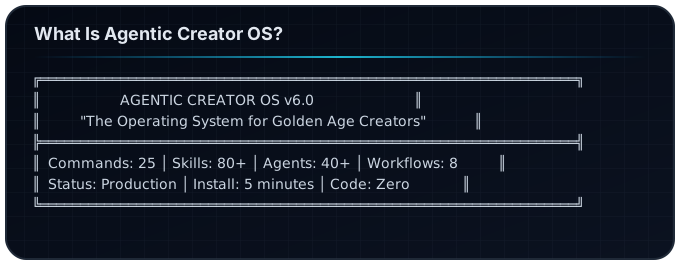
What Is Agentic Creator OS?
Agentic Creator OS is a superintelligent operating system for generative creators—a complete intelligence layer that transforms how you work with AI.
Think of it as the difference between:
- A chat tool (ask questions, get answers, lose context)
- An operating system (persistent skills, coordinated agents, automated workflows)
If you've ever felt frustrated by:
- Losing your best prompts across sessions
- AI outputs that don't sound like you
- Juggling 10 different AI tools without a system
- Starting from scratch every time you open Claude
...then ACOS is the solution.
Why Do Creators Need an AI Operating System?
The Problem: Fragmented AI Work
Most creators use AI like this:
- Open ChatGPT/Claude
- Write a prompt
- Get a response
- Copy-paste somewhere
- Repeat (losing all context)
This creates:
- Tool roulette: Jumping between AI tools with no continuity
- Prompt amnesia: Forgetting which prompts worked
- Voice dilution: Generic AI output that doesn't sound like you
- No system: Nothing compounds, nothing scales
The Solution: An Operating System
ACOS gives you:
- Persistent skills that remember how you work
- Specialized agents that maintain your voice
- Automated workflows that compound your output
- Quality gates that catch mistakes before publishing
The same system runs my:
- Music production: 12,000+ Suno tracks
- This website: 50+ blog articles
- Enterprise work: AI architecture
How Does ACOS v6 Work?
The Smart Router: One Command to Rule Them All
Version 7 centers on /acos—the single entry point to everything.
/acos
That's it. The smart router:
- Detects your intent from natural language
- Routes to the best command automatically
- Loads relevant skills without manual invocation
- Shows a menu when intent is ambiguous
Examples:
/acos "write a blog post about AI agents"
  → Routes to /article-creator
  → Auto-loads content-strategy skill

/acos "make a track about productivity"
  → Routes to /create-music
  → Auto-loads suno-ai-mastery skill

/acos "build a login feature"
  → Routes to /spec
  → Auto-loads implementation-planning skill
Auto-Activation: Skills That Load Themselves
In v5, you had to manually invoke skills with /skill suno-ai-mastery. In v6, skills activate automatically based on context.
The skill-rules.json file contains 22 activation rules:
{
  "rules": [
    {
      "skill": "content-strategy",
      "triggers": {
        "keywords": ["blog", "article", "content", "write"],
        "filePatterns": ["content/**/*.mdx"],
        "commands": ["/article-creator", "/factory"]
      },
      "priority": "high"
    }
  ]
}
When you say "write a blog post," ACOS:
- Detects the keyword "blog"
- Loads the
content-strategyskill automatically - Routes to
/article-creator - You never had to know the skill existed
The Hooks System: Quality Gates
Hooks are automated checkpoints that run at key moments:
| Hook Type | When It Runs | What It Does |
|---|---|---|
| SessionStart | When you open Claude | Loads ACOS context |
| PreToolUse | Before writing files | Checks brand voice |
| PostToolUse | After writing files | Validates quality |
| Notification | When patterns match | Suggests relevant skills |
Example: The brand voice hook catches phrases like "synergy" or "leverage" and suggests alternatives before you publish.
What Are the 7 Pillars of ACOS Architecture?
ACOS is built on 7 foundational pillars that work together:
Pillar 1: Skills Layer (Knowledge)
What: 630+ specialized knowledge modules Purpose: Domain expertise that loads on-demand
Skills are organized by category:
- Technical (18): TDD, debugging, MCP architecture, React patterns
- Creative (8): Brand voice, Suno AI, content strategy
- Business (4): OCI services, product management
- Personal (4): Productivity, health, fitness
- System (5): ACOS core, orchestration, planning
Each skill follows the 500-Line Rule:
SKILL.md: <500 lines (core instructions)
resources/patterns.md: <500 lines (detailed patterns)
resources/examples.md: <500 lines (real examples)
This enables progressive disclosure—Claude loads only what's needed, when it's needed.
Pillar 2: Agents Layer (Execution)
What: 40+ specialized AI personas Purpose: Experts for specific domains
Key agents include:
| Agent | Domain | When to Use |
|---|---|---|
| Starlight Orchestrator | Meta-coordination | Complex multi-step tasks |
| Visionary | Strategy, foresight | Big decisions |
| Creation Engine | Content, products | Writing and publishing |
| Technical Translator | AI education | Explaining complex topics |
| Frequency Alchemist | Music, audio | Suno production |
Agents can work individually or as a weighted synthesis:
Visionary (30%) + Creation Engine (25%) + Technical Translator (25%) + Frequency Alchemist (20%)
= Coordinated response blending all perspectives
Pillar 3: Workflows Layer (Process)
What: 8 orchestrated pipelines Purpose: Complex multi-step operations
| Workflow | Pattern | Example |
|---|---|---|
| Content Creation | Pipeline | Research → Write → Edit → Publish |
| Social Distribution | Parallel | LinkedIn + Twitter + Newsletter simultaneously |
| Code Review | Multi-agent | 3 reviewers check different aspects |
| Strategic Decision | Weighted | Experts vote with different weights |
Pillar 4: MCP Servers Layer (Tools)
What: 5+ external tool integrations Purpose: Connect Claude to the outside world
| Server | Capability |
|---|---|
| Browser (Playwright) | Web automation, testing, screenshots |
| Memory | Persistent knowledge graphs |
| Sequential Thinking | Complex multi-step reasoning |
| Lyric Genius | Suno prompt engineering |
| Nano Banana | Image generation via Gemini |
Pillar 5: Templates Layer (Patterns)
What: 20+ reusable content structures Purpose: Consistent quality without reinventing
Templates include:
- Social media posts (LinkedIn, Twitter, Instagram)
- Blog article structures
- Product descriptions
- Email newsletters
Pillar 6: Instances Layer (Configuration)
What: Project-specific customizations Purpose: Different voices for different projects
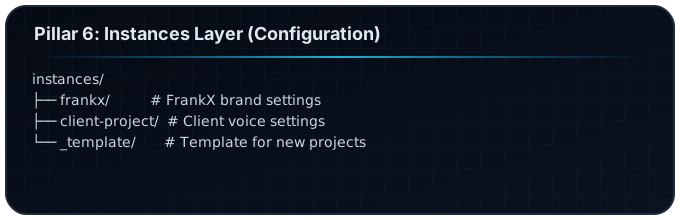
Each instance configures:
- Brand voice and tone
- Banned phrases
- Required keywords
- Color palettes
- Publishing targets
Pillar 7: Intelligence Layer (Meta)
What: Cross-cutting coordination Purpose: The orchestrator of orchestrators
The Starlight Orchestrator sits above all other components:
- Routes complex requests to the right subsystems
- Preserves context across agent handoffs
- Monitors system health
- Learns from usage patterns
What Commands Does ACOS v6 Include?
ACOS v6 ships with 25 commands across 5 categories:
Creation Commands (8)
| Command | Description |
|---|---|
/article-creator | Guided blog article creation |
/create-music | Suno music production pipeline |
/infogenius | Research-grounded image generation |
/generate-images | Direct image generation |
/generate-social | Platform-optimized social content |
/factory | Full pipeline: research → publish |
/products-creation | Digital products and courses |
/author-team | Book writing with AI team |
Strategy Commands (5)
| Command | Description |
|---|---|
/starlight-architect | Enterprise AI system design |
/council | Multi-agent strategic council |
/research | Daily intelligence operations |
/plan-week | Weekly content planning |
/harvest | Prompt discovery and collection |
Development Commands (4)
| Command | Description |
|---|---|
/spec | Spec-driven feature development |
/nextjs-deploy | Next.js + Vercel deployment |
/ux-design | UI/UX design workflows |
/automation-dev | MCP servers and automation |
System Commands (5)
| Command | Description |
|---|---|
/acos | Smart router (single entry point) |
/planning-with-files | Manus-style file planning |
/inventory-status | Content inventory dashboard |
/mcp-status | MCP server health |
/publish | Content publishing with quality gates |
Quality Commands (3)
| Command | Description |
|---|---|
/review-content | Content quality review |
/classify-content | Content routing and classification |
/polish-content | Polish to publish-ready |
How Do I Get Started with ACOS?
Option 1: Quick Install (Recommended)
# Clone the repo
git clone https://github.com/frankxai/agentic-creator-os.git
cd agentic-creator-os

# Run the installer
./install.sh

# Open Claude Code
claude

# Start using ACOS
/acos
Option 2: Manual Setup
# Clone
git clone https://github.com/frankxai/agentic-creator-os.git
cd agentic-creator-os

# Copy commands to user level
cp .claude/commands/*.md ~/.claude/commands/

# Copy skills
cp -r .claude/skills/* ~/.claude/skills/

# Open Claude Code
claude
/acos
First Commands to Try
After installation, try these:
/acos                    # See all 25 commands
/article-creator         # Write your first blog post
/create-music            # Produce a track with Suno
/inventory-status        # See content dashboard
/starlight-architect     # Design an AI system
Who Is ACOS Built For?
The AI-Curious Professional
Pain: Overwhelmed by AI tools, no coherent system
Solution: Pre-built skills and workflows for immediate productivity
Start With: /acos → pick from menu
The Overwhelmed Entrepreneur
Pain: AI outputs sound generic, not like me
Solution: Brand-aware agents and voice enforcement hooks
Start With: /article-creator with brand instance
The Enterprise Visionary
Pain: Need scalable AI for teams
Solution: Orchestration patterns and department structures
Start With: /starlight-architect for system design
The Technical Developer
Pain: Want to build custom AI workflows
Solution: MCP integrations and custom skill creation
Start With: /automation-dev for MCP servers
The Content Creator
Pain: Content production bottleneck
Solution: End-to-end content pipeline
Start With: /factory for research → publish
What's the Difference Between ACOS v5 and v6?
| Feature | v5 | v6 |
|---|---|---|
| Entry Point | Multiple commands | /acos smart router |
| Skill Activation | Manual /skill | Auto-activation |
| Hooks | None | 4 categories |
| Commands in Repo | 14 | 25 (100%) |
| GitHub Sources | 5 | 14 credited |
v6 philosophy: The Front Door
- One command to access everything
- Skills load without asking
- Quality gates run automatically
What Makes ACOS Different from Other AI Tools?
| Tool | Approach | ACOS Advantage |
|---|---|---|
| ChatGPT | Single model chat | Multi-agent orchestration |
| Claude.ai | Web chat interface | File-based persistence |
| Cursor | Code editor focus | Full creator stack |
| LangChain | Python code required | Configuration-first, no code |
| CrewAI | Developer-only | Creator-friendly, markdown-based |
ACOS unique value:
- Zero code required — Markdown and JSON only
- Creator-centric — Built for content, music, design
- Progressive disclosure — Load only what you need
- Community-sourced — 14 GitHub repos credited
Frequently Asked Questions
What is Agentic Creator OS?
Agentic Creator OS (ACOS) is an open-source operating system layer for Claude Code that adds 25 commands, 80+ skills, 40+ agents, and automated workflows to transform AI from a chat tool into a production studio.
Is ACOS free?
Yes, ACOS is completely free and open source on GitHub. No subscriptions, no paywalls.
Do I need to know how to code?
No. ACOS is configuration-first. All skills are Markdown files. All rules are JSON. You edit text files, not code.
How long does installation take?
5-10 minutes for the quick install. The installer copies all files to the right locations.
Does ACOS work with other AI models?
ACOS is built specifically for Claude Code. Some patterns could be adapted for other systems, but the commands and skills are Claude-native.
Can I use ACOS for client work?
Yes. Use the instances system to create separate brand configurations for each client while keeping the same underlying skills.
How do I create custom skills?
Copy the templates/SKILL_TEMPLATE.md file, fill in your patterns, and save to the skills directory. See the Building Custom Skills guide.
What's the difference between skills and agents?
Skills are knowledge modules—they tell Claude what to know. Agents are personas—they tell Claude how to behave.
Can I contribute to ACOS?
Yes! Fork the repo, add your skills or improvements, and submit a pull request. See CREDITS.md for contribution guidelines.
Where can I get help?
- GitHub Issues: github.com/frankxai/agentic-creator-os/issues
- Documentation: The repo README and spec files
- This blog: More tutorials and guides
Next Steps
Ready to start? Here's your path:
- Install ACOS — 5-minute quick start
- Learn Swarm Intelligence — Multi-agent orchestration patterns
- Find Your Creator Type — Use cases by archetype
- Build Custom Skills — Skill creation tutorial
- Go Enterprise — Team deployment guide
Related Articles
- The FrankX Intelligence Ecosystem — How all 5 systems work together
- Getting Started with Agentic Creator OS
- 30-Minute Creator OS Quick Start
- Agentic Workflows That Save Hours
- Creator Intelligence Systems 2026
Agentic Creator OS v6.0 — The Operating System for Golden Age Creators
Build your first AI system
Step-by-step guide to setting up ACOS, creating your first agent, and shipping real products with AI.
Start buildingProduction-ready architecture
Download AI architecture templates, multi-agent blueprints, and prompt engineering patterns.
Browse templatesJoin the builder community
Connect with creators and architects shipping AI products. Weekly office hours, shared resources, direct access.
Join the circle
Read on FrankX.AI — AI Architecture, Music & Creator Intelligence
Stay in the intelligence loop
Weekly field notes on AI systems, production patterns, and builder strategy.
Continue Reading

The Ultimate Guide: Using ElevenLabs for Faceless YouTube Channels and Higgsf...
How to combine modern AI voice models with responsive video tools for high-retention faceless production.
Read article
n8n Automation: 9 Workflows That Run My Creative Empire
Production n8n workflows for content atomization, newsletter automation, music catalog sync, research intelligence, and AI-orchestrated publishing pipelines.
Read article
Suno AI: What the Practice Actually Taught
Production lessons from a Suno practice: prompt patterns that work, genres that stick, and the workflow that makes the music findable.
Read article