ACOS Use Cases: Find Your Creator Type and Ideal Workflow
TL;DR
Discover which Agentic Creator OS workflows match your creator archetype. Writers, developers, musicians, entrepreneurs, course creators, and agencies—find your path.

Identify your creator archetype and configure ACOS for your specific workflow needs.
ACOS Use Cases: Find Your Creator Type and Ideal Workflow
Not everyone creates the same way. Here's how to configure ACOS for your archetype.
TL;DR
ACOS serves 6 creator archetypes: Writers (content → publication pipeline), Developers (spec → ship workflow), Musicians (idea → track → distribution), Entrepreneurs (strategy → execution), Course Creators (knowledge → product), and Agency Owners (client → delivery). Each archetype has different primary commands, skills, and workflows. Find yours below and start with the recommended setup.
Find Your Creator Archetype
Before diving into ACOS, identify which archetype best describes your work:
| Archetype | Primary Output | Pain Points | ACOS Solution |
|---|---|---|---|
| The Writer | Articles, books, scripts | Blank page syndrome, editing loops | Content pipeline automation |
| The Developer | Code, apps, features | Context switching, spec drift | Spec-driven development |
| The Musician | Tracks, albums, scores | Prompt iteration, distribution | Suno integration + publishing |
| The Entrepreneur | Strategy, decisions, launches | Information overload, analysis paralysis | Multi-agent council |
| The Course Creator | Courses, workshops, ebooks | Content organization, production | Knowledge → product pipeline |
| The Agency Owner | Client deliverables | Scaling, consistency, handoffs | Department automation |
Most creators are hybrids—combining 2-3 archetypes. That's fine. Start with your primary and expand.
The Writer: Content → Publication Pipeline
Who You Are
You write blog posts, newsletters, books, scripts, or documentation. Your challenge is moving from idea to published piece without getting stuck in endless revision cycles.
Your Pain Points
- Blank page syndrome: Starting is the hardest part
- Research rabbit holes: Hours disappear gathering information
- Editing loops: Never feeling "done"
- Distribution burden: Writing is fun, promoting is not
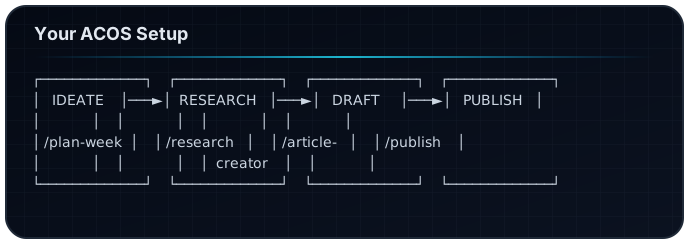
Your ACOS Setup
Primary Commands:
/article-creator    # Guided blog post creation
/factory            # Full pipeline: research → publish
/author-team        # Book writing with AI team
/polish-content     # Final refinement pass
Recommended Skills:
content-strategy— Auto-activates on "blog", "article", "write"excellence-book-writing— For long-form projectsseo-optimization— For search visibility
Your Workflow:
Quick Start:
# Your first writing session
/acos "write a blog post about [your topic]"

# ACOS will:
# 1. Load content-strategy skill
# 2. Route to /article-creator
# 3. Guide you through outline → draft → polish
# 4. Offer to publish when ready
Writer Pro Tips
- Use
/plan-weekevery Monday to batch your content ideas - Let research agent work first—don't start writing until you have sources
- Trust the polish agent—it catches things you miss after hours of staring
The Developer: Spec → Ship Workflow
Who You Are
You build software—features, apps, tools, integrations. Your challenge is translating requirements into working code without losing track of the original intent.
Your Pain Points
- Spec drift: What you build doesn't match what was asked
- Context switching: Jumping between planning and coding
- Testing gaps: Forgetting edge cases
- Documentation debt: Code ships, docs don't
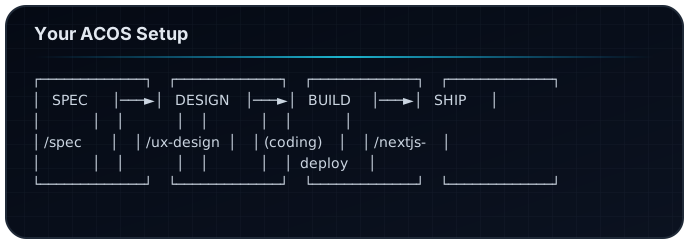
Your ACOS Setup
Primary Commands:
/spec               # Spec-driven feature development
/automation-dev     # MCP servers and tooling
/nextjs-deploy      # Ship to production
/ux-design          # UI/UX workflows
Recommended Skills:
test-driven-development— Auto-activates on "test", "spec", "feature"implementation-planning— For complex featuressystematic-debugging— When things breakmcp-architecture— For building integrations
Your Workflow:
Quick Start:
# Your first feature build
/spec "Add user authentication with OAuth"

# ACOS will:
# 1. Create spec file with requirements
# 2. Break into implementation tasks
# 3. Guide through each task with context
# 4. Run tests and validate completion
Developer Pro Tips
- Never skip the spec—
/speccreates the contract you code against - Use Task agents for exploration—don't read every file yourself
- Let
/automation-devbuild your MCP servers—it knows the patterns
The Musician: Idea → Track → Distribution
Who You Are
You create music—songs, soundscapes, scores, beats. Your challenge is turning musical ideas into finished, distributed tracks without getting lost in infinite iteration.
Your Pain Points
- Prompt iteration: Finding the right Suno prompt takes forever
- Style consistency: Keeping a coherent sound across tracks
- Distribution complexity: Getting music onto platforms
- Metadata management: Track info, artwork, descriptions
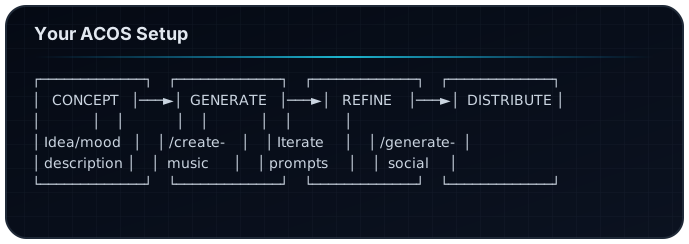
Your ACOS Setup
Primary Commands:
/create-music       # Full Suno production pipeline
/generate-images    # Album art and visuals
/generate-social    # Platform-specific promotion
/inventory-status   # Track your music catalog
Recommended Skills:
suno-ai-mastery— Auto-activates on "music", "track", "song", "Suno"frankx-brand— For consistent aesthetic (customize for your brand)
MCP Servers:
lyric-genius— Advanced prompt engineering for Suno
Your Workflow:
Quick Start:
# Your first track
/create-music "Epic orchestral piece about overcoming adversity,
               Hans Zimmer inspired, building from quiet to triumphant"

# ACOS will:
# 1. Load suno-ai-mastery skill
# 2. Craft optimized Suno prompts
# 3. Generate track variations
# 4. Create album art
# 5. Prepare social media posts
Musician Pro Tips
- Describe emotion, not just genre—"melancholic determination" beats "sad rock"
- Use Lyric Genius MCP for advanced prompt crafting
- Batch your sessions—create 5 tracks, then distribute all at once
The Entrepreneur: Strategy → Execution System
Who You Are
You run a business—making decisions, launching products, managing growth. Your challenge is cutting through information overload to make good decisions fast.
Your Pain Points
- Analysis paralysis: Too much information, no clear path
- Execution gaps: Great strategy, poor follow-through
- Scaling yourself: Can't be everywhere at once
- Consistency: Different decisions in similar situations
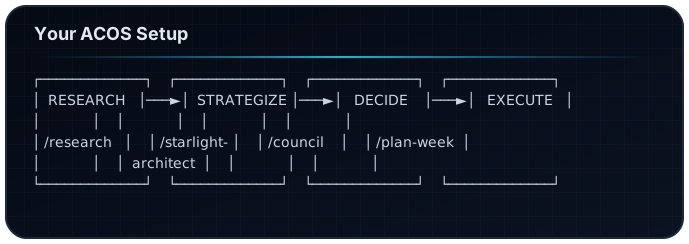
Your ACOS Setup
Primary Commands:
/starlight-architect  # Enterprise AI system design
/council              # Multi-agent strategic decisions
/research             # Market and competitive intelligence
/plan-week            # Operational planning
Recommended Skills:
product-management— Auto-activates on "launch", "product", "roadmap"content-strategy— For marketing executionoci-services-expert— If you're in enterprise/Oracle space
Your Workflow:
Quick Start:
# Your first strategic decision
/council "Should I launch a premium tier for my SaaS product?
          Current: 1000 users at $29/mo, 5% churn"

# ACOS will:
# 1. Convene Visionary (strategy), Creation Engine (product),
#    Technical Translator (feasibility)
# 2. Each agent analyzes from their perspective
# 3. Weighted synthesis produces recommendation
# 4. You get a decision report with confidence score
Entrepreneur Pro Tips
- Use
/councilfor big decisions—it forces multiple perspectives /researchbefore/council—better inputs = better decisions- Make
/plan-weeka Sunday ritual—start each week with clarity
The Course Creator: Knowledge → Product Pipeline
Who You Are
You package expertise into courses, workshops, ebooks, and educational products. Your challenge is organizing knowledge into learnable sequences and actually shipping.
Your Pain Points
- Curriculum overwhelm: Too much to teach, where to start?
- Production bottleneck: Recording, editing, publishing is slow
- Consistency: Maintaining quality across modules
- Marketing: Great course, no students
Your ACOS Setup
Primary Commands:
/products-creation   # Digital product development
/article-creator     # Course companion content
/factory             # Full content pipeline
/generate-social     # Launch marketing
Recommended Skills:
excellence-book-writing— Auto-activates for educational contentcontent-strategy— For curriculum planningcoaching-program-design— If you do 1:1 or cohort programs
Your Workflow:
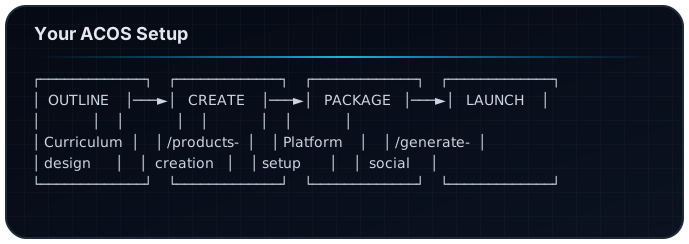
Quick Start:
# Your first course module
/products-creation "Create Module 1 of a course on
                    'Building AI Workflows with Claude Code'
                    Target: developers new to AI agents
                    Format: 5 lessons, 10-15 min each"

# ACOS will:
# 1. Generate course outline with learning objectives
# 2. Draft lesson content with examples
# 3. Create companion exercises
# 4. Suggest assessment questions
Course Creator Pro Tips
- Start with one module, not the whole course—ship and iterate
- Use
/article-creatorto create free content that leads to paid /generate-socialcan create a full launch sequence
The Agency Owner: Client → Delivery Automation
Who You Are
You run an agency—delivering services to multiple clients with a team. Your challenge is maintaining quality and consistency while scaling.
Your Pain Points
- Scaling quality: More clients = more variance
- Onboarding overhead: Every client is a fresh start
- Team consistency: Different people, different outputs
- Process documentation: Tribal knowledge in people's heads
Your ACOS Setup
Primary Commands:
/starlight-architect  # System design for client projects
/spec                 # Scoped deliverables
/review-content       # Quality assurance
/planning-with-files  # Project tracking
Recommended Skills:
implementation-planning— For project scopingcontent-strategy— If you do content/marketing servicesmcp-architecture— For technical integrations
Your Workflow:
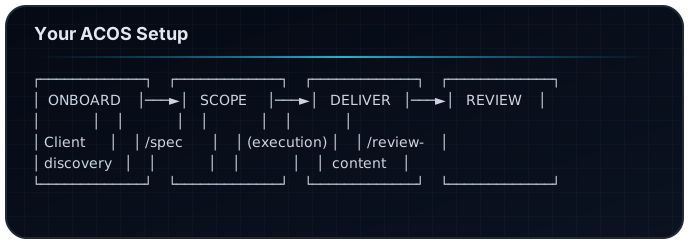
Quick Start:
# Your first client project
/spec "Website redesign for [Client Name]
       Requirements: Modern design, 5 pages, contact form
       Timeline: 4 weeks
       Budget: $5000"

# ACOS will:
# 1. Create detailed project spec
# 2. Break into phases with milestones
# 3. Generate task list for team
# 4. Set up review checkpoints
Agency Owner Pro Tips
- Create client instances—each client gets their own brand config
- Use
/review-contentas quality gate before client delivery - Document everything in planning files—reduces "how did we do X last time?"
Hybrid Creators: Combining Archetypes
Most real creators combine multiple archetypes. Here are common hybrids:
Writer + Entrepreneur (Solopreneur)
Primary: Content that drives business
Commands: /factory → /generate-social → /plan-week
Flow: Write → Distribute → Monetize
Developer + Course Creator (Educator)
Primary: Technical education products
Commands: /spec → /products-creation → /article-creator
Flow: Build → Document → Teach
Musician + Entrepreneur (Artist-Business)
Primary: Music as business
Commands: /create-music → /generate-social → /inventory-status
Flow: Create → Promote → Track
Writer + Developer (Technical Writer)
Primary: Documentation and tutorials
Commands: /article-creator + /spec integration
Flow: Understand → Document → Publish
Setup Recommendations by Type
| Archetype | First Command | First Skill | First MCP |
|---|---|---|---|
| Writer | /article-creator | content-strategy | Memory |
| Developer | /spec | test-driven-development | Browser |
| Musician | /create-music | suno-ai-mastery | Lyric Genius |
| Entrepreneur | /council | product-management | Sequential Thinking |
| Course Creator | /products-creation | excellence-book-writing | Memory |
| Agency Owner | /starlight-architect | implementation-planning | Browser |
Frequently Asked Questions
How do I know which archetype I am?
Look at what you spend most of your time creating. If it's written content, you're a Writer. If it's code, you're a Developer. Most people are hybrids—that's normal.
Can I use commands from other archetypes?
Yes — all 25 commands work for everyone. The archetypes just help you prioritize which to learn first.
How do I configure ACOS for my brand?
Create an instance in instances/your-brand/config.json with your voice settings, banned phrases, and color palette. All agents will respect these settings.
What if my work doesn't fit any archetype?
Start with Entrepreneur—the strategy commands work for almost any creative/business work. Then add specific skills as needed.
Can I create custom workflows for my hybrid?
Yes. Workflows are YAML files. You can chain any commands together. See Building Custom Skills.
Next Steps
- Identify your primary archetype from the descriptions above
- Install ACOS — Quick Start Guide
- Try your first command — Use the "Quick Start" example for your type
- Customize your instance — Add your brand voice settings
- Explore adjacent archetypes — Expand as you get comfortable
Related Articles
- The Complete Guide to Agentic Creator OS v6
- Swarm Intelligence: Multi-Agent Orchestration
- Building Custom Skills for ACOS
- Getting Started with Agentic Creator OS
Find your archetype. Configure your system. Create at scale.
Build your first AI system
Step-by-step guide to setting up ACOS, creating your first agent, and shipping real products with AI.
Start buildingProduction-ready architecture
Download AI architecture templates, multi-agent blueprints, and prompt engineering patterns.
Browse templatesJoin the builder community
Connect with creators and architects shipping AI products. Weekly office hours, shared resources, direct access.
Join the circle
Read on FrankX.AI — AI Architecture, Music & Creator Intelligence
Stay in the intelligence loop
Weekly field notes on AI systems, production patterns, and builder strategy.
Continue Reading

The Ultimate Guide: Using ElevenLabs for Faceless YouTube Channels and Higgsf...
How to combine modern AI voice models with responsive video tools for high-retention faceless production.
Read article
n8n Automation: 9 Workflows That Run My Creative Empire
Production n8n workflows for content atomization, newsletter automation, music catalog sync, research intelligence, and AI-orchestrated publishing pipelines.
Read article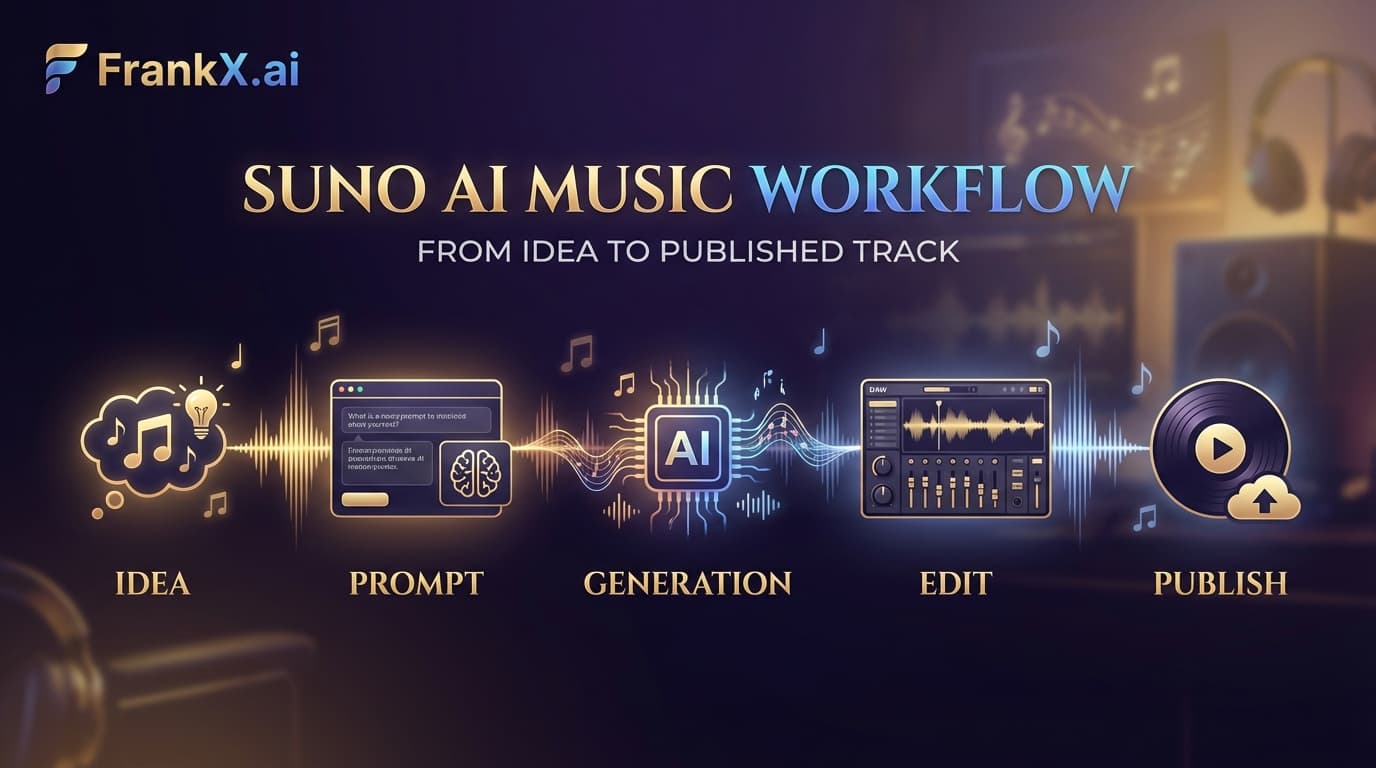
Suno AI: What the Practice Actually Taught
Production lessons from a Suno practice: prompt patterns that work, genres that stick, and the workflow that makes the music findable.
Read article