Swarm Intelligence: Multi-Agent Orchestration for Creators
TL;DR
Learn the 4 orchestration patterns that make AI agents work together: Pipeline, Parallel, Weighted Synthesis, and Iterative. Real examples from ACOS production use.

Understand the 4 orchestration patterns and implement swarm coordination in your own AI workflows.
Swarm Intelligence: Multi-Agent Orchestration for Creators
How I coordinate 40+ AI agents to produce content, music, and code.
TL;DR
Swarm intelligence in AI means multiple specialized agents working together on complex tasks. ACOS implements 4 orchestration patterns: Pipeline (sequential handoffs), Parallel (concurrent execution), Weighted Synthesis (expert voting), and Iterative (refinement loops). The Starlight Orchestrator coordinates everything. This guide shows how to use each pattern with real production examples.
What Is Swarm Intelligence in AI?
In biology, swarm intelligence describes how ants, bees, and birds achieve complex behaviors through simple individual rules and local interactions. In AI, it's the same principle applied to language models:
Single Agent:
User → Agent → Response
Swarm Intelligence:
User → Orchestrator → [Agent 1 + Agent 2 + Agent 3] → Synthesis → Response
The key insight: No single agent needs to be perfect. The swarm produces better results than any individual.
Why Use Multiple Agents?
| Single Agent Approach | Multi-Agent Approach |
|---|---|
| One perspective | Multiple perspectives |
| Limited expertise | Specialized domains |
| All-or-nothing quality | Quality through review |
| Context overload | Distributed context |
Real example from my workflow:
Single agent writing: "Write a blog post about AI"
- Generic output, no depth, misses angles
Swarm writing:
- Research Agent: Gathers current data and sources
- Strategy Agent: Identifies target keywords and structure
- Writer Agent: Drafts content with brand voice
- Editor Agent: Reviews for clarity and accuracy
- SEO Agent: Optimizes for search
The swarm produces publishable content. The single agent produces a draft.
What Are the 4 Orchestration Patterns?
ACOS implements 4 patterns for coordinating agents. Each pattern solves different problems.
Pattern 1: Pipeline (Sequential)
What: Agents work in sequence, each passing output to the next Best For: Content creation, data processing, any linear workflow
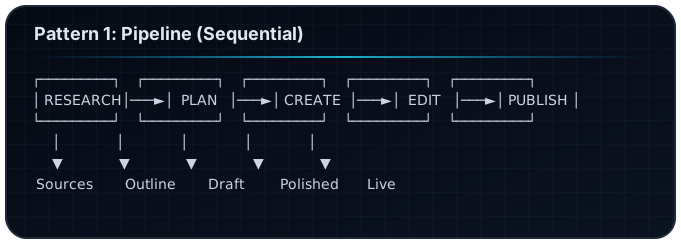
ACOS Implementation: The /factory command uses this pattern:
# workflows/content-creation/blog-pipeline.yaml
stages:
  - name: research
    agent: research-librarian
    output: findings.md

  - name: plan
    agent: content-strategist
    input: findings.md
    output: outline.md

  - name: create
    agent: creation-engine
    input: outline.md
    output: draft.mdx

  - name: edit
    agent: line-editor
    input: draft.mdx
    output: polished.mdx

  - name: publish
    agent: publisher
    input: polished.mdx
    output: live-url
When to Use Pipeline:
- Order matters (can't edit before writing)
- Each stage transforms the previous output
- Quality builds progressively
- You want traceability (see each stage's output)
When NOT to Use:
- Tasks can run simultaneously
- Waiting for sequential completion is too slow
- Stages are independent
Pattern 2: Parallel (Concurrent)
What: Multiple agents work simultaneously on different aspects Best For: Distribution, multi-perspective analysis, speed-critical tasks
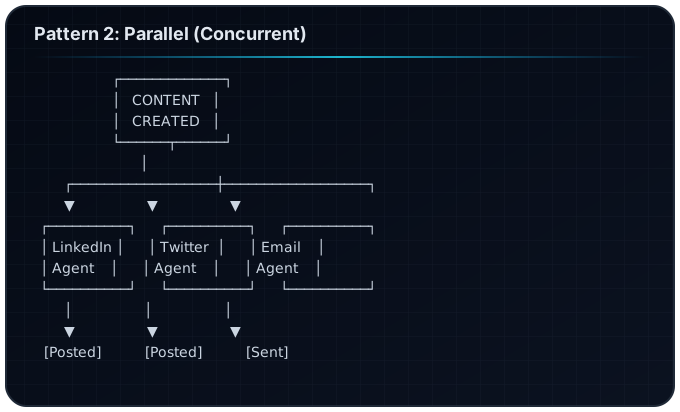
ACOS Implementation: The /generate-social command uses this:
# workflows/social-distribution/parallel.yaml
trigger: content-published

parallel_agents:
  - agent: linkedin-specialist
    template: linkedin-thought-leadership.md
    output: linkedin-post.md

  - agent: twitter-specialist
    template: twitter-thread.md
    output: twitter-thread.md

  - agent: newsletter-writer
    template: email-digest.md
    output: newsletter.md

synthesis: none # No combination needed, each publishes independently
When to Use Parallel:
- Tasks are independent
- Speed matters
- Multiple outputs needed
- No dependencies between agents
When NOT to Use:
- Agents need to see each other's work
- Results must be combined into one output
- Order of execution matters
Pattern 3: Weighted Synthesis (Expert Voting)
What: Multiple agents contribute opinions, weighted by expertise Best For: Strategic decisions, quality assessment, complex judgments
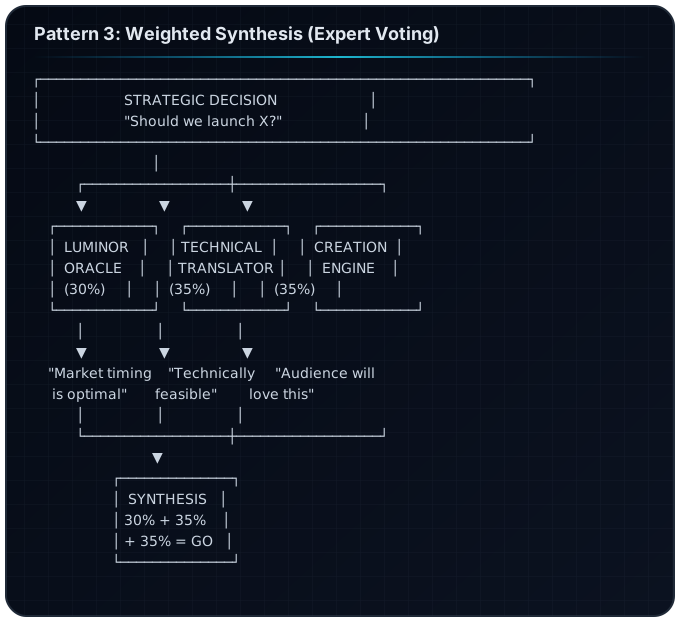
ACOS Implementation: The /council command uses this:
# workflows/decision/weighted-synthesis.yaml
decision: ${user_question}

council:
  - agent: visionary
    domain: strategy-foresight
    weight: 0.30

  - agent: technical-translator
    domain: feasibility-education
    weight: 0.35

  - agent: creation-engine
    domain: content-audience
    weight: 0.35

synthesis:
  method: weighted-average
  threshold: 0.70 # 70% confidence required
  output: decision-report.md
When to Use Weighted Synthesis:
- Multiple valid perspectives exist
- Some experts know more than others
- You need a reasoned consensus
- Decision audit trail is valuable
When NOT to Use:
- One clear correct answer exists
- Speed is more important than consensus
- Agents have identical knowledge
Pattern 4: Iterative (Refinement Loops)
What: Output cycles through review and revision until quality threshold Best For: Quality-critical content, code review, creative refinement
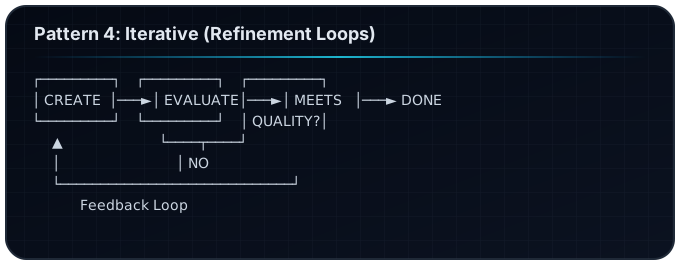
ACOS Implementation: The /polish-content command uses this:
# workflows/quality/iterative-refinement.yaml
input: draft.mdx

iterations:
  max: 5

evaluate:
  agent: quality-evaluator
  criteria:
    - voice-consistency: 0.9
    - clarity-score: 0.85
    - seo-optimization: 0.8
    - factual-accuracy: 0.95
  threshold: all-pass

refine:
  agent: line-editor
  instruction: "Fix issues identified by evaluator"

output: polished.mdx
When to Use Iterative:
- Quality is non-negotiable
- First drafts are rarely good enough
- You have clear quality criteria
- Time allows for multiple passes
When NOT to Use:
- Speed matters more than perfection
- Diminishing returns after 1-2 passes
- No clear quality metrics
How Does the Starlight Orchestrator Work?
The Starlight Orchestrator is the meta-intelligence that coordinates all agents. Think of it as the conductor of the orchestra.
What the Orchestrator Does
- Intent Detection: Understands what you're trying to accomplish
- Pattern Selection: Chooses Pipeline, Parallel, Weighted, or Iterative
- Agent Assignment: Picks the right specialists
- Context Handoff: Preserves information between agents
- Quality Monitoring: Tracks if outputs meet standards
- Synthesis: Combines multiple agent outputs when needed
How It Preserves Context
The biggest challenge in multi-agent systems is context loss. When Agent A hands off to Agent B, information can be lost.
ACOS solves this with explicit handoff files:
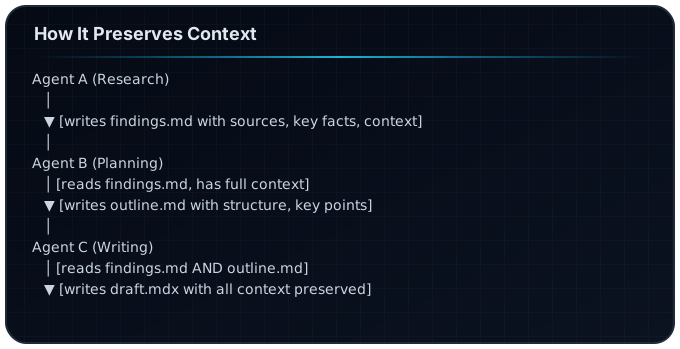
No information is passed in "memory"—it's all in files that any agent can read.
The Weighting System
Agents have weights based on domain expertise:
| Agent | Domain | Weight |
|---|---|---|
| Visionary | Strategy, foresight | 30% |
| Creation Engine | Content, products | 25% |
| Technical Translator | AI education | 25% |
| Frequency Alchemist | Music, audio | 20% |
For a music production question, Frequency Alchemist's opinion counts more. For a strategy question, Visionary leads.
Real Examples: Swarm in Action
Example 1: Content Creation Pipeline
Task: Write and publish a blog post about MCP servers
Pattern: Pipeline
Execution:
1. /research "MCP servers claude code"
   → Research Agent produces: mcp-research.md

2. Content Strategist reads research
   → Produces: mcp-outline.md (with SEO keywords)

3. Creation Engine writes draft
   → Produces: mcp-servers-guide.mdx

4. Line Editor reviews and polishes
   → Produces: mcp-servers-guide-v2.mdx

5. SEO Agent optimizes
   → Final: mcp-servers-guide-final.mdx

6. Publisher deploys
   → Live at /blog/mcp-servers-guide
Time: ~30 minutes total Quality: Publication-ready
Example 2: Code Review with 3 Agents
Task: Review a pull request for quality
Pattern: Parallel + Synthesis
Execution:
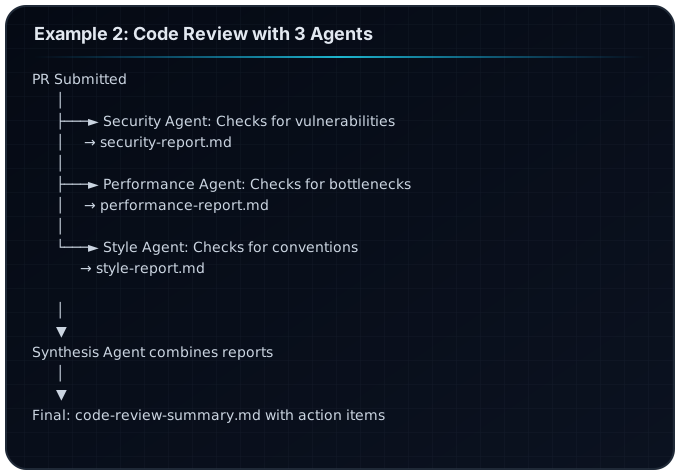
Time: ~5 minutes (parallel execution) Coverage: 3x deeper than single reviewer
Example 3: Strategic Decision with Weighted Voting
Task: Should I launch a new product line?
Pattern: Weighted Synthesis
Execution:
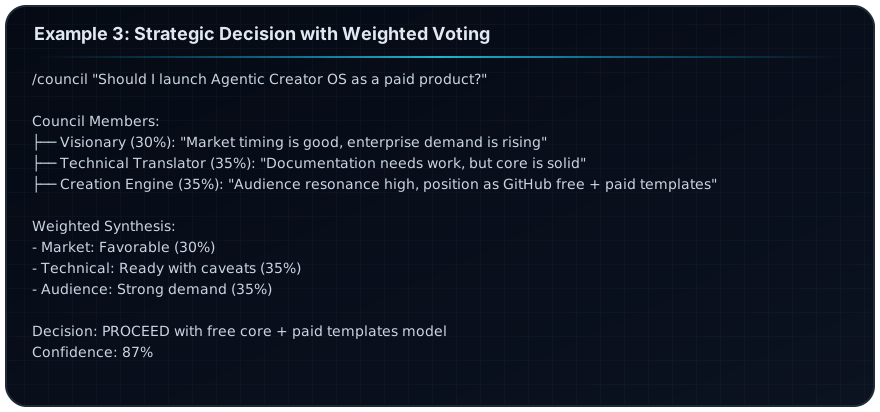
Time: ~10 minutes Quality: Reasoned decision with multiple perspectives
How Do I Implement Swarm Workflows?
Step 1: Choose Your Pattern
| Situation | Pattern |
|---|---|
| Multi-step content creation | Pipeline |
| Multi-platform distribution | Parallel |
| Big strategic decision | Weighted Synthesis |
| Quality-critical output | Iterative |
Step 2: Define Your Agents
# Create agent file: .claude/agents/my-specialist.md
---
name: My Specialist Agent
domain: specific-expertise
weight: 0.25
triggers:
  - "keyword1"
  - "keyword2"
---

You are an expert in [domain]. When activated, you:
1. Focus on [specific aspect]
2. Output in [specific format]
3. Consider [specific criteria]
Step 3: Create the Workflow
# Create workflow: workflows/my-workflow.yaml
name: My Custom Workflow
pattern: pipeline # or parallel, weighted, iterative

stages:
  - name: stage-1
    agent: agent-name
    input: previous-output.md
    output: stage-1-output.md

  - name: stage-2
    agent: another-agent
    input: stage-1-output.md
    output: final-output.md
Step 4: Trigger the Workflow
/acos "run my-workflow for [input]"
The smart router detects the workflow name and executes it.
When NOT to Use Swarm (Anti-Patterns)
Anti-Pattern 1: Swarm for Simple Tasks
Bad: Using 5 agents to write a tweet Why: Overhead exceeds benefit Instead: Single agent, direct prompt
Anti-Pattern 2: No Clear Handoff
Bad: Agents "talking" without written artifacts Why: Context lost between agents Instead: Every handoff writes to a file
Anti-Pattern 3: Equal Weights for Unequal Expertise
Bad: Security Agent and Style Agent both at 50% for security decision Why: Wrong expert has too much influence Instead: Weight by domain relevance
Anti-Pattern 4: Infinite Loops
Bad: Iterative pattern with no termination condition Why: Never finishes Instead: Always set max iterations and quality threshold
Frequently Asked Questions
What is swarm intelligence in AI?
Swarm intelligence describes multiple AI agents working together, each contributing specialized expertise, coordinated by an orchestrator. The collective output exceeds what any single agent could produce.
How many agents can work together?
ACOS supports up to 10 concurrent agents in parallel patterns. For weighted synthesis, 3-5 agents is optimal to balance perspectives without diluting expertise.
Does multi-agent orchestration cost more?
Yes, more agents means more API calls. But for high-value tasks like content creation or strategic decisions, the quality improvement justifies the cost.
Can agents disagree?
Yes—and that's the point. The weighted synthesis pattern specifically allows conflicting opinions to be combined into a reasoned decision.
How do I debug swarm workflows?
Each agent writes its output to a file. Check the files at each stage to see where things went wrong. The orchestrator also logs agent selection and handoff decisions.
Can I create custom orchestration patterns?
Yes. ACOS workflows are YAML files. You can combine patterns (e.g., Pipeline with Iterative refinement at one stage) to create custom flows.
Next Steps
- Start with Pipeline: The
/factorycommand is the easiest way to experience swarm intelligence - Try Weighted Synthesis: Use
/councilfor your next big decision - Build a Custom Workflow: Follow the steps above to create your own
- Read the Architecture: ACOS Complete Guide
Related Articles
- The Complete Guide to Agentic Creator OS v6
- ACOS Use Cases: Find Your Creator Type
- Building Custom Skills for ACOS
- MCP Server Integration Guide
Swarm Intelligence — The future of AI isn't one agent doing everything. It's many agents doing what they do best.
Build your first AI system
Step-by-step guide to setting up ACOS, creating your first agent, and shipping real products with AI.
Start buildingProduction-ready architecture
Download AI architecture templates, multi-agent blueprints, and prompt engineering patterns.
Browse templatesJoin the builder community
Connect with creators and architects shipping AI products. Weekly office hours, shared resources, direct access.
Join the circle
Read on FrankX.AI — AI Architecture, Music & Creator Intelligence
Stay in the intelligence loop
Weekly field notes on AI systems, production patterns, and builder strategy.
Continue Reading

Terminal-First AI Development: Drop VS Code Tabs, Keep Your Laptop Alive
How to run Claude Code without 5 VS Code tabs killing your machine. glow + tmux + GitHub browser replaces the whole GUI stack.
Read article
Vibe OS: Multi-LLM Agent Ecosystem for Music Creation and AI Orchestration
An integrated platform combining AI music production, multi-LLM orchestration, and intelligent agent coordination. Built on Claude, GPT, Gemini, Grok, and Llama.
Read article
AWS Bedrock AgentCore: Production Patterns for Enterprise AI Agents
A comprehensive guide to building production-ready AI agents on AWS using Bedrock, AgentCore, and the Strands framework.
Read article