5 Agentic Workflows That Save Creators 10+ Hours Per Week
TL;DR
Production workflows I use daily: blog publishing, ops reports, client onboarding, content repurposing, code review. Copy these patterns and automate the grind.

Copy 5 production-ready workflows to automate your most time-consuming tasks.
5 Agentic Workflows That Save Creators 10+ Hours Per Week
The exact workflows running my content, consulting, and development.
TL;DR
Five workflows I run daily: (1) /publish — takes a title, produces blog post + hero image + social content in 30 minutes instead of 4 hours; (2) /weekly-ops — automated ops report pulling traffic, content, revenue data; (3) /onboard — client folder structure, welcome email, invoice template; (4) /repurpose — one blog post becomes LinkedIn, Twitter, video script, newsletter; (5) /review — code analysis, documentation, PR description. Combined savings: ~16 hours per week.
Repetitive work compounds against you. Blog posts, client updates, social content, reports—individually 30-60 minutes. Together, 10-15 hours lost weekly.
The Agentic Creator OS runs these as automated workflows. Copy the patterns below into your setup.
Workflow 1: Blog Publishing Pipeline
Manual time: 3-4 hours per post Automated time: 30 minutes (review/edit) Weekly savings: 4-6 hours (for 2 posts)
The Workflow
/publish "Blog Title Here"

Steps:

1. CONTENT: Research topic, write draft, add SEO
2. DESIGN: Generate hero image, format visuals
3. DEV: Create MDX file, deploy to production
4. MARKETING: Generate social posts, schedule distribution
What Happens
Step 1: Content Creation
→ Research trending content on topic
→ Create outline based on your style
→ Write 1,500-2,000 word draft
→ Add FAQ section for SEO
→ Include internal links
Step 2: Visual Assets
→ Generate hero image matching brand
→ Create OG image for social sharing
→ Format any code blocks or diagrams
Step 3: Deployment
→ Create MDX file with frontmatter
→ Run build verification
→ Deploy to production
→ Verify live URL
Step 4: Distribution
→ Generate LinkedIn post
→ Create Twitter thread
→ Draft newsletter snippet
→ Schedule posts (if integrated)
Implementation
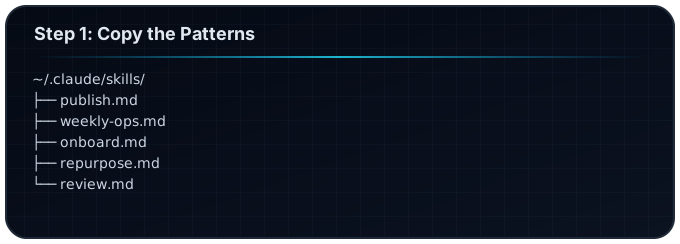
Create ~/.claude/skills/publish.md:
# /publish

When I say "/publish [title]", execute this workflow:

## Phase 1: Content

- Research: Find 3-5 top articles on this topic
- Outline: Create H2/H3 structure matching my blog style
- Draft: Write 1,500+ words with code examples where relevant
- SEO: Add 5+ FAQ questions at the end

## Phase 2: Assets

- Hero: Generate image with topic visualization
- Meta: Create title (60 chars), description (155 chars)

## Phase 3: Deploy

- File: Create content/blog/[slug].mdx
- Build: Verify no errors
- Deploy: Push to production

## Phase 4: Social

- LinkedIn: 1,300 char post with hook
- Twitter: 5-7 tweet thread
- Output: Display all content for review

Wait for my approval before deploying.
Workflow 2: Weekly Operations Report
Manual time: 2-3 hours Automated time: 10 minutes (review) Weekly savings: 2 hours
The Workflow
/weekly-ops

Steps:

1. ANALYTICS: Pull traffic, engagement, revenue data
2. CONTENT: List published content and performance
3. BUSINESS: Revenue summary, new leads, tasks completed
4. PLANNING: Next week priorities
What Happens
## Weekly Operations Report: Jan 20-26, 2026

### Traffic & Engagement

- Website visits: 2,340 (+15% vs last week)
- Blog views: 1,230 (top: "Jarvis Tutorial" at 450)
- Newsletter: 234 opens, 12% click rate

### Content Published

1. "Build Your Own Jarvis" - 450 views
2. "Creator Intelligence Systems" - 320 views
3. "Getting Started Guide" - [scheduled for Tuesday]

### Revenue

- Pro tier signups: 3 ($891)
- Consulting inquiries: 2

### GitHub

- Stars: 47 (+23 this week)
- Issues opened: 5
- PRs merged: 2

### Next Week Priorities

1. Complete tutorial video
2. Launch newsletter campaign
3. Publish 3 more blog posts
Implementation
# /weekly-ops

Generate weekly operations report:

## Data Sources

- Read analytics from /dashboard if available
- Count blog posts published this week
- Check git log for commits
- Review products.json for revenue indicators

## Report Format

1. **Summary**: 3-bullet overview
2. **Content**: What was published, performance
3. **Business**: Revenue, leads, growth
4. **Technical**: GitHub activity, deployments
5. **Next Week**: Top 3 priorities

Output as formatted markdown.
Workflow 3: Client Onboarding
Manual time: 1-2 hours per client Automated time: 15 minutes Monthly savings: 4-8 hours (for 4 clients)
The Workflow
/onboard "Client Name" type:consulting

Steps:

1. BUSINESS: Create CRM entry, project folder structure
2. CONTENT: Generate welcome email, kickoff agenda
3. DEV: Set up project repository (if needed)
4. ADMIN: Create invoice, set reminders
What Happens
CRM Entry Created:
{
  "client": "Acme Corp",
  "type": "consulting",
  "status": "onboarding",
  "startDate": "2026-01-21",
  "contact": {
    "name": "Jane Smith",
    "email": "jane@acme.com"
  }
}
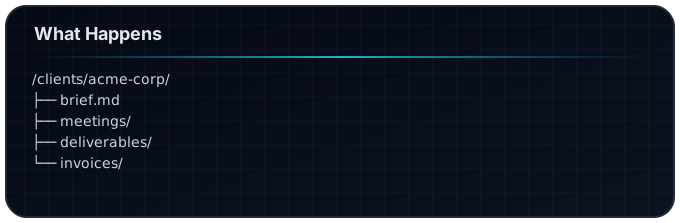
Folder Structure:
Welcome Email Draft:
Subject: Welcome to FrankX - Let's Build Something Great

Hi Jane,

Excited to kick off our work together...
[Personalized based on project type]
Implementation
# /onboard

When I say "/onboard [client] type:[project-type]":

1. Create client folder at /clients/[client-slug]/
2. Generate brief.md with:
   - Client name, contact info
   - Project type and scope
   - Key dates and milestones
3. Draft welcome email matching my tone
4. Create invoice template
5. Add to task list: "Schedule kickoff call"

Output all generated content for review.
Workflow 4: Content Repurposing
Manual time: 1-2 hours per piece Automated time: 10 minutes Weekly savings: 2-4 hours
The Workflow
/repurpose "blog-post-slug"

Steps:

1. READ: Extract key points from blog post
2. SOCIAL: Generate LinkedIn post, Twitter thread
3. VIDEO: Create video script outline
4. EMAIL: Draft newsletter version
What Happens
Takes one blog post and creates:
LinkedIn Post (1,300 chars):
Every creator I talk to wants the same thing:

"I want my own Jarvis."

Not another chat tool. Not another subscription.

A personal AI that:
→ Knows your projects
→ Remembers your preferences
→ Executes your workflows
→ Gets smarter over time

Here's how to build it (free): [link]
Twitter Thread (7 tweets):
1/ Every creator wants their own Jarvis.

Here's how to build one (for free):

🧵

2/ The problem with AI tools...
[continues for 7 tweets]
Video Script Outline:
Hook (0-10s): "What if you had your own Jarvis?"
Problem (10-45s): Generic AI doesn't know you
Solution (45-90s): The Agentic Creator OS
Demo (90-180s): Show the workflow
CTA (180-210s): Get it free on GitHub
Newsletter Version (300 words, casual tone)
Implementation
# /repurpose

When I say "/repurpose [slug]":

1. Read content/blog/[slug].mdx
2. Extract:
   - Main thesis
   - Top 3 takeaways
   - Best quotes
   - Key stats

3. Generate:
   - LinkedIn: 1,300 chars, hook + value + CTA
   - Twitter: 7-tweet thread, numbered
   - Video: Outline with timestamps
   - Email: 300 words, conversational

Output all versions for review and scheduling.
Workflow 5: Code Review & Documentation
Manual time: 1-2 hours per feature Automated time: 20 minutes Weekly savings: 2-4 hours
The Workflow
/review feature:authentication

Steps:

1. DEV: Scan code changes, identify issues
2. CONTENT: Generate documentation
3. TEST: Suggest test cases
4. SHIP: Create PR description
What Happens
Code Review:
## Review: Authentication Feature

### Changes Analyzed

- lib/auth.ts (82 lines added)
- middleware.ts (23 lines modified)
- app/api/auth/route.ts (new file)

### Findings

✅ Good: Rate limiting implemented
✅ Good: Input validation present
⚠️ Note: Consider adding refresh token rotation
❌ Issue: Missing error logging in catch block

### Recommendations

1. Add error logging at line 45
2. Consider implementing token refresh
3. Add integration tests for edge cases
Documentation Generated:
# Authentication System

## Overview

JWT-based authentication with email/password login.

## Endpoints

- POST /api/auth/login - Authenticate user
- POST /api/auth/logout - Clear session
- GET /api/auth/me - Get current user

## Usage

[Code examples]
Implementation
# /review

When I say "/review feature:[name]":

1. Find recent changes related to [name]
2. Analyze for:
   - Security issues
   - Performance concerns
   - Code quality
   - Missing tests
   - Documentation gaps

3. Generate:
   - Review summary with findings
   - Documentation draft
   - Test suggestions
   - PR description

Output review for my approval before creating PR.
How to Use These Workflows
Step 1: Copy the Patterns
Create skill files for each workflow:
Step 2: Customize to Your Needs
- Adjust tone and formatting
- Add your specific tools and integrations
- Include your brand guidelines
- Set up required data sources
Step 3: Test and Refine
- Run each workflow 2-3 times
- Note what works and what doesn't
- Iterate based on results
- Add error handling as needed
Step 4: Stack and Automate
Once workflows are solid:
- Chain workflows together
- Set up triggers (if your setup supports it)
- Build daily/weekly rituals around them
Time Savings Calculator
| Workflow | Manual | Automated | Frequency | Weekly Savings |
|---|---|---|---|---|
| Blog Publishing | 4 hrs | 30 min | 2x/week | 7 hrs |
| Weekly Ops | 2 hrs | 10 min | 1x/week | 1.8 hrs |
| Client Onboarding | 1.5 hrs | 15 min | 2x/month | 0.6 hrs |
| Content Repurposing | 1.5 hrs | 10 min | 3x/week | 4 hrs |
| Code Review | 1.5 hrs | 20 min | 2x/week | 2.3 hrs |
Total Weekly Savings: ~16 hours
That's 2 full work days reclaimed every week.
Get the Full System
All these workflows work best with the complete Agentic Creator OS:
- Free on GitHub: Full system, MIT license
- Pro Setup ($297): 1:1 setup call, custom configuration
- Enterprise: Team deployment and support
Start Small
Don't try to implement all 5 at once. Pick the ONE workflow that wastes the most of your time right now.
Set it up. Use it for a week. Refine it. Then add the next one.
Compound automation beats scattered optimization every time.
FAQ
Can I use these without the full Agentic Creator OS?
Yes. Each workflow is a standalone skill file. Create the markdown file in ~/.claude/skills/ and it works with vanilla Claude Code. The full system adds coordination between departments.
How do I connect to my analytics/CRM/email?
MCP servers handle integrations. The Agentic Creator OS includes pre-built servers for common tools. Custom integrations require writing an MCP server or using the API directly in your workflow.
What if a workflow fails partway through?
Each workflow asks for approval before destructive actions (deploying, sending emails). If something fails, you can re-run from that step. Add error handling in your skill file as you learn what can break.
Are these workflows specific to creators?
The patterns apply broadly—developers, consultants, anyone with repetitive knowledge work. The examples use creator terminology but the underlying automation transfers.
How long to set up all five workflows?
About 2-3 hours total. Start with one, run it for a week, then add the next. Compound automation works better than scattered optimization.
Related:
Build your first AI system
Step-by-step guide to setting up ACOS, creating your first agent, and shipping real products with AI.
Start buildingProduction-ready architecture
Download AI architecture templates, multi-agent blueprints, and prompt engineering patterns.
Browse templatesJoin the builder community
Connect with creators and architects shipping AI products. Weekly office hours, shared resources, direct access.
Join the circle
Read on FrankX.AI — AI Architecture, Music & Creator Intelligence
Stay in the intelligence loop
Weekly field notes on AI systems, production patterns, and builder strategy.
Continue Reading

Agentic SEO Publishing Masterplan: 12-Day Accelerator from September 19
Build a 15,000-word intelligence system that fuses Google's latest search dynamics with agentic AI production pipelines.
Read article
The 4-Hour Workweek, Rebuilt for AI Architects in 2026
Every DEAL chapter rebuilt for founders using AI agents, governed automation, human specialists, and deliberate freedom.
Read article
The Ultimate n8n Workflow in 2026
The complete 2026 guide to building production n8n workflows: self-host vs cloud, the AI Agent node, MCP Server Trigger and Client Tool, content repurposing, RAG, and wiring n8n as the ...
Read article