ACOS for Enterprise: Team Deployment and Governance Guide
TL;DR
Scale Agentic Creator OS to teams with department structures, governance models, access control, and enterprise integration patterns.

Deploy ACOS to your team with proper governance, access control, and scaling patterns.
ACOS for Enterprise: Team Deployment and Governance Guide
From solo creator to coordinated team. Scale without losing control.
TL;DR
Enterprise ACOS deployment requires: (1) Department structures for team organization, (2) Instance configs for brand/client separation, (3) Governance rules for approval workflows, (4) Access control for sensitive operations, and (5) Integration patterns for existing tools. This guide covers the architecture, implementation, and best practices for teams of 5-100+ users.
Why Enterprise ACOS Is Different
Solo ACOS: One person, one brand, full autonomy.
Enterprise ACOS: Multiple people, multiple brands, coordinated governance.
The Challenges:
| Challenge | Solo | Enterprise |
|---|---|---|
| Brand consistency | Your brain | Documented + enforced |
| Quality control | Trust yourself | Approval workflows |
| Access control | N/A | Role-based permissions |
| Audit trail | N/A | Required for compliance |
| Scaling | N/A | Distributed instances |
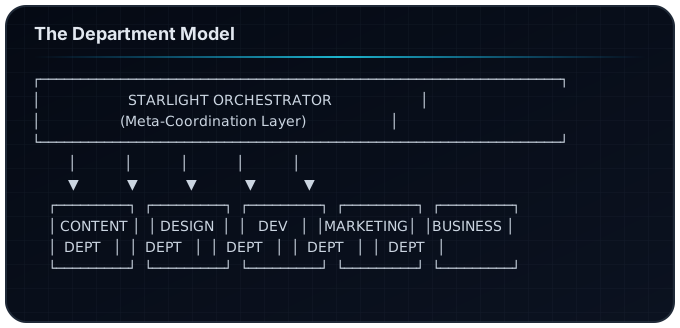
The Department Model
ACOS organizes team capabilities into 5 departments:
Content Department
Responsibility: Written content, documentation, copywriting
Roles:
- Content Lead (strategy, editorial calendar)
- Writer (drafts, articles)
- Editor (review, polish)
- Publisher (deployment, distribution)
Commands:
/article-creator/factory/polish-content/publish
Design Department
Responsibility: Visual assets, UI/UX, brand materials
Roles:
- Design Lead (visual strategy)
- Visual Designer (graphics, images)
- UX Designer (interfaces, flows)
- Brand Guardian (consistency)
Commands:
/infogenius/ux-design/generate-images
Dev Department
Responsibility: Code, integrations, automation
Roles:
- Tech Lead (architecture)
- Frontend (UI implementation)
- Backend (APIs, data)
- DevOps (deployment, infrastructure)
Commands:
/spec/nextjs-deploy/automation-dev
Marketing Department
Responsibility: Growth, distribution, analytics
Roles:
- Marketing Lead (strategy)
- Growth (acquisition, conversion)
- Social (distribution)
- Analytics (measurement)
Commands:
/generate-social/research- SEO/AEO workflows
Business Department
Responsibility: Strategy, operations, revenue
Roles:
- Strategy Lead
- Operations
- Sales
- Finance
Commands:
/starlight-architect/council/plan-week
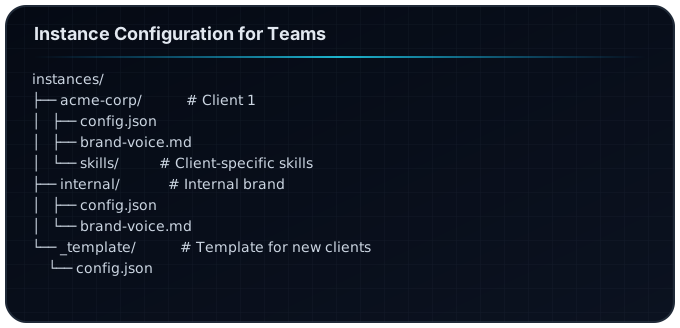
Instance Configuration for Teams
Each team/client/brand gets an instance configuration:
config.json Structure
{
  "instance": {
    "name": "Acme Corp",
    "id": "acme-corp",
    "type": "client"
  },
  "brand": {
    "voice": "professional, innovative, approachable",
    "tone": "confident but not arrogant",
    "bannedPhrases": ["synergy", "leverage", "disrupt"],
    "preferredTerms": {
      "users": "customers",
      "product": "solution",
      "buy": "invest in"
    }
  },
  "governance": {
    "approvalRequired": ["publish", "deploy"],
    "approvers": ["content-lead", "brand-guardian"],
    "auditLog": true
  },
  "access": {
    "departments": ["content", "design", "marketing"],
    "restrictedCommands": ["/deploy", "/automation-dev"],
    "apiKeys": {
      "inherit": false,
      "required": ["openai", "anthropic"]
    }
  },
  "integration": {
    "slack": "#acme-content",
    "jira": "ACME",
    "github": "acme-corp/website"
  }
}
Governance Model
Approval Workflows
Define what needs approval and who can approve:
# governance/approval-workflows.yaml

workflows:
  content-publish:
    trigger: /publish
    steps:
      - name: quality-check
        type: automated
        agent: quality-evaluator
        threshold: 0.85

      - name: brand-review
        type: manual
        approvers:
          - role: content-lead
          - role: brand-guardian
        timeout: 24h

      - name: final-approval
        type: manual
        approvers:
          - role: department-head
        required_if: "content.type == 'press-release'"

  code-deploy:
    trigger: /deploy
    steps:
      - name: tests
        type: automated
        command: npm test

      - name: security-scan
        type: automated
        command: npm audit

      - name: tech-lead-approval
        type: manual
        approvers:
          - role: tech-lead
Audit Logging
Track all significant actions:
{
  "auditLog": {
    "enabled": true,
    "storage": "s3://audit-logs/acos/",
    "retention": "90d",
    "events": [
      "command-executed",
      "content-published",
      "approval-granted",
      "approval-denied",
      "config-changed",
      "access-granted"
    ]
  }
}
Log Entry Example:
{
  "timestamp": "2026-01-27T14:30:00Z",
  "event": "content-published",
  "user": "jane@company.com",
  "instance": "acme-corp",
  "department": "content",
  "action": "/publish",
  "artifact": "blog/ai-strategy-2026.mdx",
  "approvers": ["john@company.com", "sarah@company.com"],
  "metadata": {
    "wordCount": 2500,
    "qualityScore": 0.92
  }
}
Access Control
Role-Based Permissions
# access/roles.yaml

roles:
  admin:
    permissions:
      - "*"
    description: Full system access

  department-lead:
    permissions:
      - "commands.*"
      - "approve.department"
      - "config.read"
    restrictions:
      - "config.write"
      - "access.modify"

  creator:
    permissions:
      - "commands.content"
      - "commands.design"
    restrictions:
      - "commands.deploy"
      - "commands.automation"
      - "approve.*"

  viewer:
    permissions:
      - "read.*"
    restrictions:
      - "commands.*"
      - "approve.*"
Command Restrictions
{
  "access": {
    "commandRestrictions": {
      "/deploy": ["admin", "tech-lead"],
      "/automation-dev": ["admin", "dev"],
      "/publish": ["admin", "content-lead", "creator"],
      "/council": ["admin", "department-lead"]
    }
  }
}
API Key Management
{
  "apiKeys": {
    "strategy": "vault",
    "vaultPath": "secret/acos/{{instance}}/",
    "rotation": "30d",
    "audit": true,
    "perUser": false,
    "perInstance": true
  }
}
Scaling Patterns
Pattern 1: Centralized Hub
All teams share one ACOS installation, separated by instances:
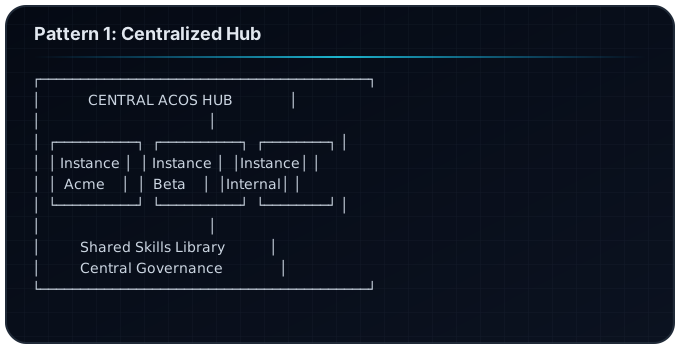
Best For: Small-medium teams (5-30 people)
Pattern 2: Federated Instances
Each department/client gets their own ACOS installation:
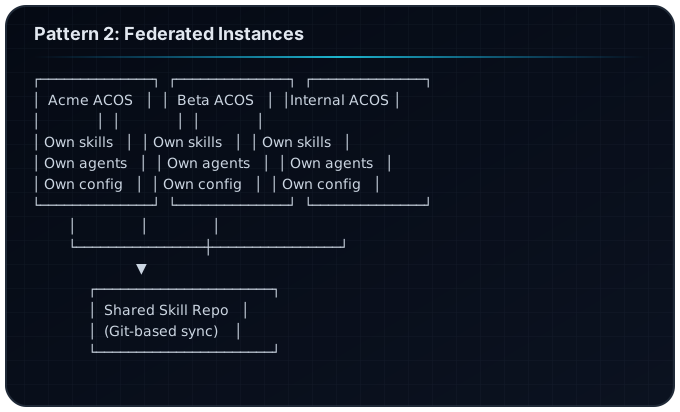
Best For: Large teams (30-100+), multi-client agencies
Pattern 3: Hybrid
Core skills shared, client-specific customization local:
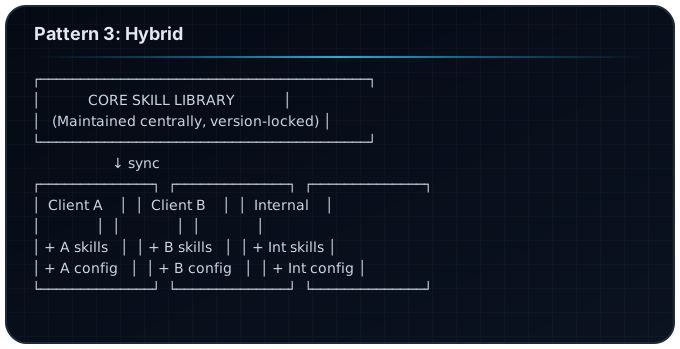
Best For: Agencies with diverse clients
Integration Patterns
Slack Integration
{
  "integrations": {
    "slack": {
      "webhook": "https://hooks.slack.com/...",
      "channels": {
        "content": "#content-reviews",
        "deploy": "#deployments",
        "alerts": "#acos-alerts"
      },
      "notifications": {
        "approval-requested": true,
        "content-published": true,
        "error": true
      }
    }
  }
}
Jira Integration
{
  "integrations": {
    "jira": {
      "baseUrl": "https://company.atlassian.net",
      "project": "CONTENT",
      "createIssues": {
        "onApprovalRequest": true,
        "onError": true
      },
      "linkArtifacts": true
    }
  }
}
GitHub Integration
{
  "integrations": {
    "github": {
      "org": "company",
      "repos": {
        "content": "company/website-content",
        "code": "company/website"
      },
      "prWorkflow": {
        "enabled": true,
        "reviewers": ["content-team"],
        "labels": ["acos-generated"]
      }
    }
  }
}
Deployment Checklist
Phase 1: Pilot (Week 1-2)
- Install ACOS on pilot team machines
- Create instance config for pilot project
- Define basic governance rules
- Train pilot users (2-5 people)
- Collect feedback
Phase 2: Department Rollout (Week 3-4)
- Create department configs
- Set up approval workflows
- Configure integrations (Slack, Jira)
- Train department leads
- Establish audit logging
Phase 3: Full Deployment (Week 5-8)
- Roll out to all departments
- Configure cross-department workflows
- Set up API key management
- Implement access control
- Create runbooks for common issues
Phase 4: Optimization (Ongoing)
- Review audit logs monthly
- Refine governance rules
- Add custom skills based on team needs
- Measure productivity impact
- Share learnings across teams
Measuring Enterprise Success
Productivity Metrics
| Metric | Measurement | Target |
|---|---|---|
| Content velocity | Articles/week | +50% |
| Time to publish | Hours from draft | -40% |
| Review cycles | Rounds per piece | -30% |
| Error rate | Issues post-publish | -60% |
Governance Metrics
| Metric | Measurement | Target |
|---|---|---|
| Approval time | Hours to approve | Under 24h |
| Compliance rate | Audit pass rate | Above 95% |
| Incident rate | Governance violations | Under 5/month |
Adoption Metrics
| Metric | Measurement | Target |
|---|---|---|
| DAU | Daily active users | >80% |
| Command usage | Commands/user/day | >5 |
| Skill adoption | Skills loaded/session | >3 |
Frequently Asked Questions
How many users can ACOS support?
ACOS itself has no user limit. Scaling depends on your Claude API capacity and infrastructure. Teams of 100+ are feasible with proper architecture.
Do all users need Claude Pro?
Users need Claude Code access. API costs scale with usage. Consider team/enterprise API agreements for large deployments.
How do we handle sensitive client data?
Use separate instances with isolated configs and API keys. Implement audit logging. Consider on-premise deployment for highly sensitive work.
Can we customize ACOS for our industry?
Yes. Create industry-specific skills, add compliance hooks, and configure brand voice for your domain.
How do we train new team members?
Start with the Quick Start guide, then department-specific workflows. Assign mentors from pilot users.
What happens if ACOS makes a mistake?
Governance workflows catch issues before publish. Audit logs track what happened. Rollback procedures restore previous states.
Next Steps
- Start with a pilot — Don't roll out to everyone at once
- Define governance early — Harder to add later
- Invest in training — Adoption depends on understanding
- Measure and iterate — What gets measured improves
Related Articles
- The Complete Guide to Agentic Creator OS v6
- Swarm Intelligence: Multi-Agent Orchestration
- The ACOS Hooks System
- ACOS Use Cases by Creator Type
Scale AI-powered creation. Maintain control and quality.
Build your first AI system
Step-by-step guide to setting up ACOS, creating your first agent, and shipping real products with AI.
Start buildingProduction-ready architecture
Download AI architecture templates, multi-agent blueprints, and prompt engineering patterns.
Browse templatesJoin the builder community
Connect with creators and architects shipping AI products. Weekly office hours, shared resources, direct access.
Join the circle
Read on FrankX.AI — AI Architecture, Music & Creator Intelligence
Stay in the intelligence loop
Weekly field notes on AI systems, production patterns, and builder strategy.
Continue Reading

The Agent Skill Standard: Evaluated Workflows in Production
A guide to authoring testable AI skills under the Agent Skill Standard. Move from brittle prompt templates to reproducible code-grade operating knowledge.
Read article
Autonomous Product Dev & The AI Foundry: Building Software with Swarms
How sovereign creators and elite engineering teams design, scaffold, test, and ship autonomous micro-SaaS products using multi-agent swarms.
Read article
Modern Agentic Systems Architecture: From ReAct Loops to Trajectory Evals
A comprehensive teardown of production multi-agent systems, Model Context Protocol standards, context compression, and trajectory evaluation gates.
Read article