AWS Bedrock AgentCore: Production Patterns for Enterprise AI Agents
TL;DR
AWS offers three tiers for building AI agents: Bedrock Agents (managed, no-code), AgentCore (framework-agnostic runtime), and Strands (open-source orchestration). The key differentiator is security-first design with IAM integration, Guardrails for content filtering, and.

You'll master production agent architecture, tool integration patterns, and resilient multi-agent orchestration systems.
TL;DR: AWS offers three tiers for building AI agents: Bedrock Agents (managed, no-code), AgentCore (framework-agnostic runtime), and Strands (open-source orchestration). The key differentiator is security-first design with IAM integration, Guardrails for content filtering, and managed memory that persists across sessions. Choose Bedrock Agents for quick deployment, AgentCore for production workloads, and Strands for complex multi-agent systems.
Part 2 of 8: Production Agent Patterns Series
This is Part 2 of the Production Agent Patterns series. If you haven't read Part 1, start there for the 7 Pillars framework that guides this analysis.
Series Navigation:
- The 7 Pillars of Production Agent Systems
- AWS Bedrock AgentCore (this post)
- Google Vertex AI Agent Engine (coming soon)
- Azure AI Foundry
- OpenAI Agents SDK
- Claude Agent SDK
- MCP - The Unifying Standard
- Choosing Your Stack (Decision Guide)
AWS's Three-Tier Agent Architecture
AWS doesn't offer just one way to build agents—they offer three, each optimized for different use cases:
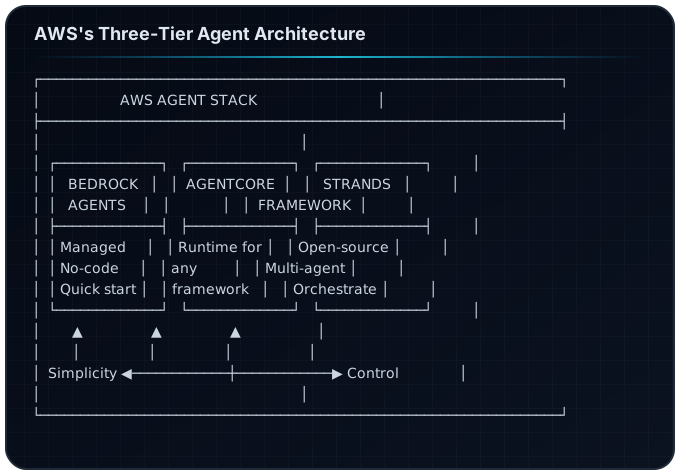
When to Use What
| Tier | Best For | Trade-off |
|---|---|---|
| Bedrock Agents | Rapid prototyping, simple use cases | Less flexibility |
| AgentCore | Production workloads, enterprise | More setup |
| Strands | Complex multi-agent, custom orchestration | Most complex |
Pillar 1: Orchestration with Strands
AWS's answer to multi-agent coordination is the open-source Strands framework. It provides three patterns:
Pattern 1: Swarms
Multiple agents work in parallel on the same task, with results aggregated.
from strands import Swarm, Agent

# Define specialized agents
researcher = Agent(
    name="researcher",
    model="anthropic.claude-sonnet-4",
    instructions="You research and gather information."
)

analyst = Agent(
    name="analyst",
    model="anthropic.claude-sonnet-4",
    instructions="You analyze data and find patterns."
)

# Create swarm
research_swarm = Swarm(
    agents=[researcher, analyst],
    aggregation="consensus"  # or "vote", "merge"
)

# Execute
result = research_swarm.run("Analyze Q4 sales performance")
Pattern 2: Agent Graphs
Directed graphs with conditional routing between agents.
from strands import AgentGraph, Edge

graph = AgentGraph()

# Add nodes
graph.add_agent(intake_agent, node_id="intake")
graph.add_agent(research_agent, node_id="research")
graph.add_agent(write_agent, node_id="write")
graph.add_agent(review_agent, node_id="review")

# Add edges with conditions
graph.add_edge("intake", "research")
graph.add_edge("research", "write", condition=lambda s: len(s.sources) >= 3)
graph.add_edge("write", "review")
graph.add_edge("review", "write", condition=lambda s: s.needs_revision)
graph.add_edge("review", "END", condition=lambda s: s.approved)

# Execute
result = graph.run("Create a market analysis report")
Pattern 3: Workflows
Sequential pipelines with explicit state passing.
from strands import Workflow, Step

workflow = Workflow([
    Step("gather", research_agent),
    Step("analyze", analyst_agent),
    Step("synthesize", writer_agent),
    Step("validate", reviewer_agent),
])

result = workflow.run("Research quantum computing trends")
Pillar 2: Memory with AgentCore
AgentCore provides managed memory that persists across sessions—a key production requirement.
Memory Types
from bedrock_agentcore import Agent, Memory

agent = Agent(
    model_id="anthropic.claude-sonnet-4",
    memory=Memory(
        # Short-term: conversation context
        short_term_enabled=True,
        short_term_window=10,  # Last 10 messages

        # Long-term: semantic extraction
        long_term_enabled=True,
        long_term_extraction="auto",  # Auto-extract facts

        # Session persistence
        session_id="user-123-session-456",
        persistence="dynamodb"  # or "s3"
    )
)
Semantic Memory Extraction
AgentCore automatically extracts and stores semantic information:
# After conversation, memory contains:
{
    "user_preferences": {
        "communication_style": "technical",
        "timezone": "PST",
        "role": "engineering_manager"
    },
    "learned_facts": [
        "User's team uses Python for backend",
        "Deployment target is EKS",
        "Budget constraint: $10k/month"
    ],
    "interaction_patterns": {
        "peak_hours": "9am-11am",
        "avg_session_length": "15min"
    }
}
Pillar 3: Guardrails
AWS Bedrock Guardrails is the most comprehensive content filtering system across all providers.
Configuration
from bedrock import Guardrails

guardrails = Guardrails(
    # Content filters
    content_policy={
        "hate": {"strength": "HIGH"},
        "insults": {"strength": "MEDIUM"},
        "sexual": {"strength": "HIGH"},
        "violence": {"strength": "HIGH"},
    },

    # Topic blocking
    denied_topics=[
        "competitor_products",
        "internal_financials",
        "unreleased_features"
    ],

    # PII handling
    pii_config={
        "action": "ANONYMIZE",  # or "BLOCK"
        "types": ["EMAIL", "PHONE", "SSN", "CREDIT_CARD"]
    },

    # Word filters
    word_filters={
        "profanity": "BLOCK",
        "custom_words": ["secret_project", "codename_x"]
    },

    # Grounding check (hallucination prevention)
    grounding={
        "enabled": True,
        "threshold": 0.7,
        "source_required": True
    }
)

# Attach to agent
agent = Agent(
    model_id="anthropic.claude-sonnet-4",
    guardrails=guardrails
)
The Action Router Pattern
AWS recommends keeping business logic OUTSIDE the model:
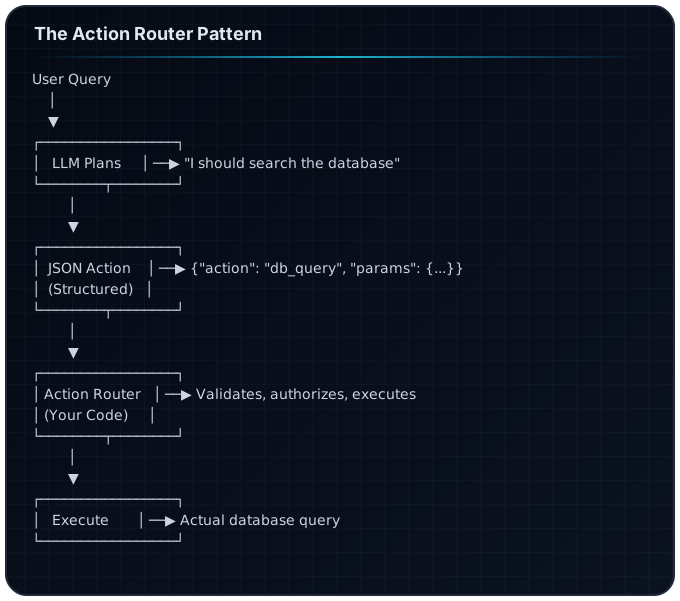
This pattern ensures:
- Predictable behavior: Your code controls execution
- Security: Validation happens in your code, not the LLM
- Auditability: Every action is logged and traceable
Pillar 4: Observability
AWS integrates with CloudWatch and X-Ray for comprehensive tracing.
CloudWatch Metrics
from bedrock_agentcore import Agent, CloudWatchMetrics

agent = Agent(
    model_id="anthropic.claude-sonnet-4",
    metrics=CloudWatchMetrics(
        namespace="MyApp/Agents",
        dimensions={"AgentName": "ResearchAssistant"},
        metrics=[
            "InvocationCount",
            "Latency",
            "TokensUsed",
            "ErrorRate",
            "GuardrailTriggered"
        ]
    )
)
X-Ray Tracing
from aws_xray_sdk.core import xray_recorder

@xray_recorder.capture("agent_execution")
async def run_agent(query: str):
    with xray_recorder.in_subsegment("tool_calls"):
        result = await agent.run(query)
    return result
What to Track
| Metric | Why It Matters |
|---|---|
InvocationLatency | User experience |
TokensPerInvocation | Cost management |
GuardrailBlockRate | Safety signal |
ToolCallSuccess | Reliability |
MemoryHitRate | Context effectiveness |
Pillar 5: Security
AWS's security model is the most mature, built on IAM integration.
Agent IAM Roles
{
  "Version": "2012-10-17",
  "Statement": [
    {
      "Effect": "Allow",
      "Action": ["bedrock:InvokeModel", "bedrock:InvokeAgent"],
      "Resource": "arn:aws:bedrock:*:*:agent/*"
    },
    {
      "Effect": "Allow",
      "Action": ["dynamodb:GetItem", "dynamodb:Query"],
      "Resource": "arn:aws:dynamodb:*:*:table/AgentMemory",
      "Condition": {
        "ForAllValues:StringEquals": {
          "dynamodb:LeadingKeys": ["${aws:PrincipalTag/AgentId}"]
        }
      }
    }
  ]
}
Tool-Level Permissions
from bedrock_agentcore import Tool, Permission

# Define tool with explicit permissions
database_tool = Tool(
    name="query_database",
    description="Query the sales database",
    permissions=Permission(
        allowed_tables=["sales", "products"],
        denied_tables=["users", "credentials"],
        row_filter="department = ${user.department}",
        max_rows=1000
    )
)
Secrets Management
from bedrock_agentcore import Agent
import boto3

# Use Secrets Manager for API keys
secrets = boto3.client('secretsmanager')

agent = Agent(
    model_id="anthropic.claude-sonnet-4",
    tools=[
        Tool(
            name="external_api",
            api_key=secrets.get_secret_value(
                SecretId="prod/external-api-key"
            )["SecretString"]
        )
    ]
)
Pillar 6: Cost Management
AWS provides several cost optimization features:
Provisioned Throughput
For predictable workloads, reserve capacity:
# Reserve 100 model units for Claude Sonnet
# Saves ~30% vs on-demand for consistent usage
Prompt Caching
Bedrock automatically caches prompts with shared prefixes:
# System prompt (cached after first call)
SYSTEM_PROMPT = """You are a research assistant...
[2000 tokens of instructions]
"""

# User-specific context (not cached)
user_context = f"User: {user.name}, Role: {user.role}"

# This call benefits from caching
response = agent.invoke(
    system=SYSTEM_PROMPT,  # Cached
    context=user_context,  # Not cached
    query=user_query       # Not cached
)
Token Budgets
from bedrock_agentcore import Agent, TokenBudget

agent = Agent(
    model_id="anthropic.claude-sonnet-4",
    token_budget=TokenBudget(
        max_input_tokens=10000,
        max_output_tokens=4000,
        max_total_per_session=50000,
        on_exceed="graceful_stop"  # or "error"
    )
)
Cost Comparison
| Model | Input (per 1M) | Output (per 1M) | Best For |
|---|---|---|---|
| Claude Sonnet 4 | $3.00 | $15.00 | Complex reasoning |
| Claude Haiku | $0.25 | $1.25 | Simple tasks |
| Llama 3.3 70B | $2.65 | $3.50 | Cost-sensitive |
Pillar 7: Lifecycle (AgentOps)
CI/CD with AWS CodePipeline
# buildspec.yml
version: 0.2
phases:
  install:
    commands:
      - pip install -r requirements.txt
  test:
    commands:
      - pytest tests/agent_tests.py -v
      - python scripts/evaluate_agent.py --threshold 0.85
  deploy:
    commands:
      - aws bedrock update-agent --agent-id $AGENT_ID --agent-config file://agent-config.json
Blue-Green Deployment
# Deploy new version alongside existing
new_agent = deploy_agent(config, version="v2")

# Gradual traffic shift
traffic_config = {
    "v1": 90,  # 90% to existing
    "v2": 10   # 10% to new
}

# Monitor metrics, then shift
if new_agent.metrics.error_rate < 0.01:
    traffic_config = {"v1": 0, "v2": 100}
Rollback
# Automatic rollback on error spike
if agent.metrics.error_rate > 0.05:
    rollback_to_version("v1")
    alert_team("Agent v2 rolled back due to high error rate")
Complete Example: Research Assistant on AWS
Here's a production-ready implementation:
"""
Research Assistant Agent - AWS Bedrock/AgentCore Implementation
Demonstrates all 7 pillars of production agent systems.
"""

import boto3
from bedrock_agentcore import Agent, Tool, Memory, Guardrails
from strands import Workflow, Step

# Pillar 5: Security - IAM-based configuration
session = boto3.Session(profile_name="production")

# Pillar 3: Guardrails
guardrails = Guardrails(
    content_policy={"hate": {"strength": "HIGH"}},
    pii_config={"action": "ANONYMIZE"},
    grounding={"enabled": True, "threshold": 0.7}
)

# Pillar 2: Memory
memory = Memory(
    short_term_enabled=True,
    long_term_enabled=True,
    persistence="dynamodb",
    table_name="AgentMemory"
)

# Pillar 1: Orchestration - Tools
search_tool = Tool(
    name="web_search",
    description="Search the web for information",
    handler=lambda q: search_api.search(q)
)

fetch_tool = Tool(
    name="fetch_url",
    description="Fetch content from a URL",
    handler=lambda url: fetch_and_parse(url)
)

# Create agent
agent = Agent(
    model_id="anthropic.claude-sonnet-4",
    instructions="You are a research assistant...",
    tools=[search_tool, fetch_tool],
    memory=memory,
    guardrails=guardrails,
    # Pillar 6: Cost management
    token_budget={"max_total": 50000},
    # Pillar 4: Observability
    metrics_namespace="ResearchApp/Agents"
)

# Pillar 7: Lifecycle - Versioning
agent.version = "1.2.0"
agent.deploy(environment="production")
When to Choose AWS
Choose AWS Bedrock/AgentCore if:
- You're already in the AWS ecosystem
- Security and compliance are top priorities
- You need enterprise-grade IAM integration
- You want managed memory persistence
- You're building multi-agent systems (Strands)
Consider alternatives if:
- You need provider portability (use OpenAI/Claude SDKs)
- You want simpler setup (use managed services)
- Cost is the primary concern (compare Llama hosting)
FAQ
How does AgentCore compare to Bedrock Agents?
Bedrock Agents is a managed, no-code solution for simple use cases. AgentCore is a framework-agnostic runtime for production workloads that need custom logic, multiple frameworks, or complex orchestration.
Can I use non-AWS models with AgentCore?
Yes. AgentCore is framework-agnostic. You can use models from Anthropic, Meta, Cohere, or even external providers via API integration.
What's the latency overhead of Guardrails?
Guardrails adds approximately 100-200ms to each request. For latency-sensitive applications, you can configure async guardrails that run in parallel with the main request.
How do I migrate from Bedrock Agents to AgentCore?
Export your agent configuration from Bedrock Agents, then import into AgentCore. AWS provides migration scripts that preserve memory and conversation history.
What's the cost of managed memory?
Memory uses DynamoDB under the hood. For most use cases, you'll stay within the free tier. High-volume applications typically see $5-20/month for memory storage.
Next in the Series
Part 3: Google Vertex AI Agent Engine
We'll explore Google's "agentic leap" vision, the Agent2Agent protocol, and how Model Armor provides security for production deployments.
Sources
- Amazon Bedrock Documentation
- AgentCore Developer Guide
- AWS Strands Framework
- Bedrock Guardrails
- Building AI Agents on AWS in 2025
- Multi-Agent Orchestration on AWS
Related Articles
- Production Agent Patterns: 7 Pillars — Framework-agnostic patterns
- Production LLM Agents on OCI — Oracle Cloud implementation
- Multi-Agent Orchestration Patterns — Coordination strategies
Build your first AI system
Step-by-step guide to setting up ACOS, creating your first agent, and shipping real products with AI.
Start buildingProduction-ready architecture
Download AI architecture templates, multi-agent blueprints, and prompt engineering patterns.
Browse templatesJoin the builder community
Connect with creators and architects shipping AI products. Weekly office hours, shared resources, direct access.
Join the circle
Read on FrankX.AI — AI Architecture, Music & Creator Intelligence
Stay in the intelligence loop
Weekly field notes on AI systems, production patterns, and builder strategy.
Continue Reading

Terminal-First AI Development: Drop VS Code Tabs, Keep Your Laptop Alive
How to run Claude Code without 5 VS Code tabs killing your machine. glow + tmux + GitHub browser replaces the whole GUI stack.
Read article
Vibe OS: Multi-LLM Agent Ecosystem for Music Creation and AI Orchestration
An integrated platform combining AI music production, multi-LLM orchestration, and intelligent agent coordination. Built on Claude, GPT, Gemini, Grok, and Llama.
Read article
Swarm Intelligence: Multi-Agent Orchestration for Creators
Learn the 4 orchestration patterns that make AI agents work together: Pipeline, Parallel, Weighted Synthesis, and Iterative. Real examples from ACOS production use.
Read article