Codex Plugins for Teams: A Practical Operating Guide
TL;DR
Use Chat for quick answers, ChatGPT Work for longer review-ready deliverables, and Codex for codebases and developer workflows. Skills encode methods; plugins distribute skills and optional connected capabilities. OpenAI provides the execution and workspace controls, while teams still need explicit ownership, permissions, testing, versioning, and release discipline.

Choose the right OpenAI surface, package a reusable workflow, and establish a safe team release process.
The short version
OpenAI now offers several related ways to work, and the names are easy to collapse into one idea. They are not the same thing.
- Chat is best for quick questions, drafts, and conversational analysis.
- ChatGPT Work is designed for longer, multi-step tasks that produce a review-ready result.
- Codex is the agent for software work: understanding repositories, changing code, running checks, and working with developer tools.
- Skills are reusable methods that teach an agent how to perform a particular kind of work.
- Plugins are installable bundles that can distribute skills, an MCP-backed app, or both.
The clean team model is to place reusable instructions and safe examples in a skill or plugin, while private records remain in the system that already controls their access.
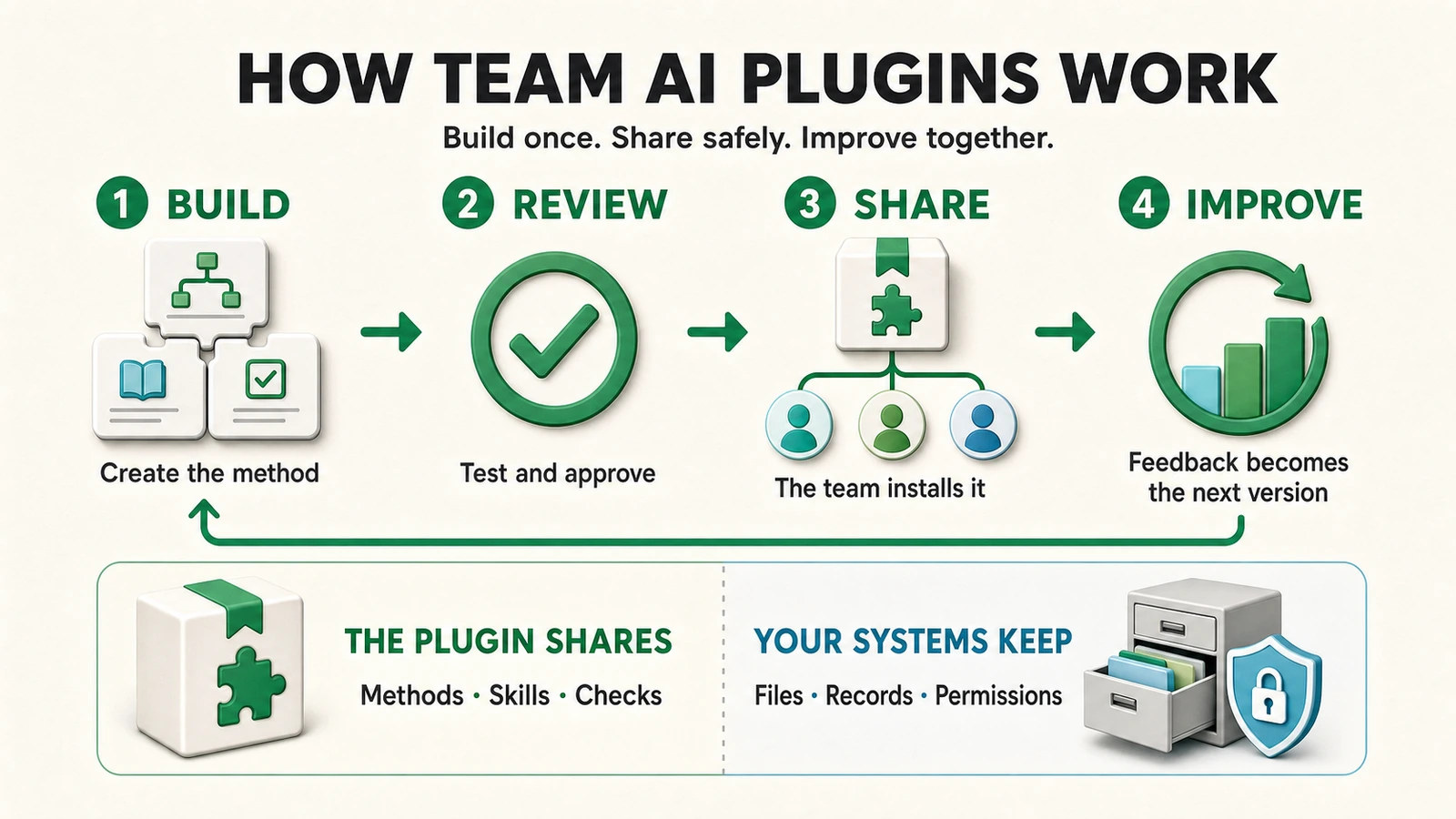
A reusable workflow becomes dependable only when ownership, review, release, and feedback are explicit.
Start by choosing the right surface
The first decision is not “Which plugin do we build?” It is “Where should this work happen?”
| Surface | Best fit | Where work runs | Plugin note |
|---|---|---|---|
| ChatGPT Chat | Questions, exploration, drafts | Hosted ChatGPT experience | Use approved workspace capabilities when available |
| ChatGPT Work on the web | Longer research, synthesis, and review-ready artifacts | Hosted ChatGPT experience | Supports plugins in eligible workspaces |
| ChatGPT Work on desktop | Multi-step work involving local files, apps, or browser context | Desktop plus supported connected environments | Supports plugins; available capabilities depend on the client and workspace |
| Codex desktop | Repository work, code changes, testing, and developer workflows | Local workspace with configured tools | Supports plugins and local skills |
| Codex CLI | Terminal-first coding and automation | Your local terminal environment | Provides /plugins and marketplace commands |
| Codex IDE integration | Coding inside the editor | Local project and editor environment | Skills and MCP are documented; verify plugin availability in the current client |
| Codex cloud | Isolated hosted software tasks | OpenAI-managed cloud environment | Treat its environment and permissions separately from local Codex |
Two distinctions matter:
- Work is not a subscription plan. It is a mode and experience for completing longer tasks. ChatGPT Business is a workspace plan.
- ChatGPT and Codex overlap, but they are not interchangeable. ChatGPT is the broader knowledge-work product; Codex is optimized for software engineering and codebase execution.
OpenAI’s current quickstart and ChatGPT usage guide are the best places to verify which surfaces are available to your workspace.
The vocabulary: skill, plugin, app, and MCP
These four concepts form a stack.
A skill is the method
A skill is a reusable folder of instructions and supporting resources. It can define:
- when the workflow should run;
- the sequence of work;
- quality checks and stop conditions;
- safe examples and templates;
- scripts or reference files used by the workflow.
A useful skill is narrow enough to test. “Help with operations” is vague. “Turn meeting notes into a decision log, identify unresolved owners, and draft the follow-up” is testable.
OpenAI documents three practical distribution patterns:
- Workspace skills managed through ChatGPT for a team.
- Local filesystem skills available to an individual Codex environment.
- Plugin-packaged skills distributed as part of a larger installable bundle.
See Build skills and Skills and plugins for the current mechanics.
A plugin is the distribution unit
A plugin is an installable package. It can contain skills, an app connected through MCP, or both. Depending on the package, it may also include configuration, hooks, browser resources, scheduled-task templates, and assets.
That makes a plugin appropriate when a workflow needs one or more of the following:
- a coordinated set of skills;
- a consistent installation experience;
- a connected business system;
- versioned updates for a group;
- shared configuration and release metadata.
An app is a user-facing connected capability
An app exposes tools or information from another system to ChatGPT or Codex. A custom app uses MCP, the Model Context Protocol, to describe those tools.
The important security boundary is this:
Installing a plugin does not automatically authorize its app, and authorizing an app does not override permissions in the source system.
If a plugin can query a document system, the user still needs an authorized connection and access to the relevant documents. Removing a plugin also does not necessarily disconnect the underlying app connection; administrators should manage those lifecycles independently.
What a well-structured team plugin looks like
Here is a generic, hypothetical layout:
team-operations-toolkit/
├─ .codex-plugin/
│  └─ plugin.json
├─ skills/
│  ├─ weekly-brief/
│  │  ├─ SKILL.md
│  │  └─ references/
│  ├─ research-check/
│  │  └─ SKILL.md
│  └─ client-ready-review/
│     └─ SKILL.md
├─ .mcp.json              # only when connected tools are required
├─ hooks/                 # optional automation boundaries
└─ README.md
The package should contain the reusable method, schemas, and synthetic examples. It should not contain live customer documents, employee records, credentials, confidential strategy, or copied private templates unless the repository and every distribution path are explicitly approved for that data.
Two ways teams share a plugin
1. Workspace-native sharing
For eligible ChatGPT workspaces, a creator can open the desktop plugin directory, find a plugin under Created by you, and use Share to grant access to members, groups, or a workspace link. Recipients find it under Shared with you.
This is workspace sharing, not public marketplace publication. Administrators may disable sharing or require review. It is the simplest path when the team wants a managed workspace experience and does not need a code-centric release process.
2. A Git-maintained marketplace
Engineering-led teams can keep plugin packages in a private Git repository and expose them through a marketplace manifest. This provides pull requests, protected branches, tests, tagged releases, changelogs, and rollback.
The generic CLI flow is:
codex plugin marketplace add owner/team-plugins --ref main
codex plugin marketplace list
Then launch Codex, enter /plugins, choose the plugin, install it, and start a new session so the current skills and tools load.
To refresh marketplace metadata later:
codex plugin marketplace upgrade team-plugins
After an upgrade, review the offered plugin update in /plugins and begin a new session. An update should never be treated as an invisible global mutation: users need a clear version, changelog, and effective date.
The commands above follow OpenAI’s plugin-building and distribution guide. Replace the example owner, repository, and marketplace name with your approved private source.
How permissions actually work
Teams get into trouble when they treat “plugin installed” as “workflow authorized.” A safe execution crosses several independent gates:
Workspace policy allows the plugin
        ↓
The member can install or receive it
        ↓
Any connected app is separately authorized
        ↓
The source system permits the requested records and actions
        ↓
The current ChatGPT or Codex surface applies its runtime controls
        ↓
A human approves consequential output or action where required
Examples:
- A document-review skill may be installed but unable to read a restricted folder.
- A project-management app may read tickets but lack permission to close them.
- A local Codex task may edit a repository but still require approval before a production deployment.
- A workspace administrator may allow a plugin while disabling member-to-member sharing.
OpenAI provides workspace-level plugin controls and skill controls. The connected source, repository, and deployment platform retain their own controls.
How individuals improve a shared workflow
A team needs a contribution path that works for both technical and nontechnical people.
For a small wording or method change
- Capture the problem with the input, expected output, and what failed.
- Change the skill instructions or safe example in a branch or workspace draft.
- Run a small evaluation set containing normal, edge, and refusal cases.
- Have the workflow owner review the behavior, not just the prose.
- Release a new version with a plain-language changelog.
For a new connected action
- Define the minimum read and write permissions.
- Decide whether an existing approved app is sufficient.
- If necessary, expose the new tool through MCP.
- Add confirmation before destructive, financial, legal, external-message, or production actions.
- Test authorization failure, missing data, partial completion, and rollback.
- Obtain administrator and system-owner approval before release.
For nontechnical contributors
Do not require everyone to learn Git. Provide a structured intake form with:
- workflow name and owner;
- example input with private data removed;
- desired result;
- current failure;
- sensitivity level;
- affected team;
- urgency and proposed acceptance criteria.
A maintainer can convert that request into a tested change. The contributor then validates the result before it ships.
A release model that scales
OpenAI provides the agent, plugin surfaces, workspace controls, and connected-app framework. It does not replace your operating model. The following is a FrankX recommendation for team governance, not an OpenAI product requirement.
| Role | Accountable for |
|---|---|
| Workflow owner | Business method, acceptable output, and human approval points |
| Technical maintainer | Package structure, tests, permissions, version, and rollback |
| Security or data owner | Allowed systems, data classes, retention, and external actions |
| Contributor | Reproducible feedback and validation of the change |
| Release approver | Final decision for higher-risk changes |
Classify releases by consequence:
- Low risk: wording, formatting, or safe examples; peer review and automated checks.
- Medium risk: changed decision logic or a new read-only data source; workflow-owner review plus permission testing.
- High risk: write actions, external messages, production changes, payments, or regulated data; explicit system-owner approval, staged rollout, audit record, and rollback plan.
Every release should answer five questions:
- What changed?
- Who approved it?
- What data and tools can it reach?
- How was it tested?
- How do we revert it?
What ChatGPT Business provides—and what it does not
ChatGPT Business provides a dedicated workspace, essential administrative controls, SAML SSO and MFA, and OpenAI states that business data is not used for model training by default. Organizations with stronger identity, audit, retention, residency, analytics, or role requirements should evaluate Enterprise or Edu capabilities against their policies.
Even with Business or Enterprise, a mature plugin program usually needs adjacent tooling:
| Need | Typical system |
|---|---|
| Version history and review | GitHub, GitLab, or another source repository |
| Private working documents | Google Drive, SharePoint, Notion, or an approved document platform |
| Requests and approvals | Linear, Jira, ServiceNow, or a structured form |
| Automated tests | Repository CI and workflow-specific evaluations |
| Secrets | A managed secrets platform, never a skill file |
| Production delivery | The application’s existing deployment platform and approval controls |
The product boundary is healthy: ChatGPT and Codex perform the work; the systems of record keep ownership of identity, access, data, and deployment.
A practical first workflow
Start with a workflow that is frequent, reviewable, and reversible—for example, turning internal meeting notes into a decision log.
- Write the expected output schema.
- Create a skill with the method and synthetic examples.
- Keep the actual meeting notes in the approved document system.
- Test ten representative cases, including missing owners and contradictory decisions.
- Pilot with two or three people.
- Measure correction rate, time saved, and unsafe assumptions.
- Release the first shared version only after the owner accepts the results.
Use OpenAI’s built-in skill creator where it is exposed—Codex documents $skill-creator—and follow the current skill guide. For a larger package, use the plugin creator shown by your client and the plugin guide; invocation syntax can differ by surface.
The durable operating principle
The best team plugin is not the one with the most instructions. It is the one whose boundary is obvious:
Reusable method → skill
Installable collection → plugin
Connected capability → app through MCP
Private records → governed source system
Change history → version control
Consequential action → explicit approval
When those boundaries are designed first, teams can share improvements without copying private context into public packages, grant the minimum necessary access, and update workflows without losing control of what changed.
For the latest product behavior, consult OpenAI’s official plugins documentation, projects guide, and Work guide.

Read on FrankX.AI — AI Architecture, Music & Creator Intelligence
Stay in the intelligence loop
Field notes on AI systems, production patterns, and builder strategy.
Continue Reading
GPT-6 Astra for founders: ChatGPT, Work and Codex
Turn GPT-6 Astra into a useful founder workflow across ChatGPT, Work and Codex, with clear briefs, source checks, web design tests and reviewable handoffs.
Read article
One Still-Life, Three Native Generators
The same product brief tested across Grok Imagine, Codex image_gen, and Antigravity generate_image. A direct evaluation of native visual models without external wrapper degradation.
Read article