Build a YouTube Channel with AI-Powered Tools
A 6-step framework for creators who want to build a sustainable YouTube channel using AI tools at every stage of production. From research to distribution.
6 Steps to a Sustainable Channel
Each step builds on the last. Master one before moving to the next.
Define Your Pillars
Define Your Pillars
Pick 3-5 content pillars that represent your expertise. Each pillar serves a different audience need and gives you variety without losing focus.
- Choose pillars you can sustain for 6+ months
- Mix technical depth with accessible opinion pieces
- Include at least one short-form pillar for algorithm reach
Plan Your Calendar
Plan Your Calendar
Map out 4 weeks of content at a time. Assign each slot to a pillar with clear cadence. This prevents decision fatigue and keeps you consistent.
- Set realistic cadence — 2-3 videos/week is a strong start
- Theme each week to batch similar research
- Leave one "flex" slot for trending topics
Script with Claude Code
Script with Claude Code
Use /video-produce to generate structured scripts. Claude Code understands video pacing — hooks, segments, transitions, CTAs — all formatted for your teleprompter.
- Start with a strong hook in the first 8 seconds
- Use /deep-research for topic validation first
- Include timestamps for B-roll insertion points
/video-produceRecord & Edit
Record & Edit
Screen recording for tutorials, talking head for opinions. CapCut handles captions, transitions, and color grading. Keep it authentic — don't over-produce.
- Invest in lighting over camera quality
- Use CapCut auto-captions — 95% accuracy, minor edits needed
- Record in batches: 2-3 videos per session
Clip & Atomize
Clip & Atomize
One long-form video becomes 5+ assets. Opus Clip extracts viral moments. /video-clip generates formatted shorts. Each video feeds your entire content ecosystem.
- Target 15-60 second clips for Shorts/Reels
- Use /video-clip to auto-identify peak moments
- Cross-post: YouTube Shorts, X, Instagram Reels
/video-clipDistribute & Measure
Distribute & Measure
Push to all platforms with /video-to-blog for written repurposing. Track CTR, retention, and click-through. Use data to refine pillars and double down on winners.
- Repurpose every video into a blog post
- Track average % viewed, not just views
- A/B test thumbnails on the first 3 videos
/video-to-blogFrank's Production Pipeline
This is the actual workflow behind every video on the FrankX channel. One video in, five assets out.
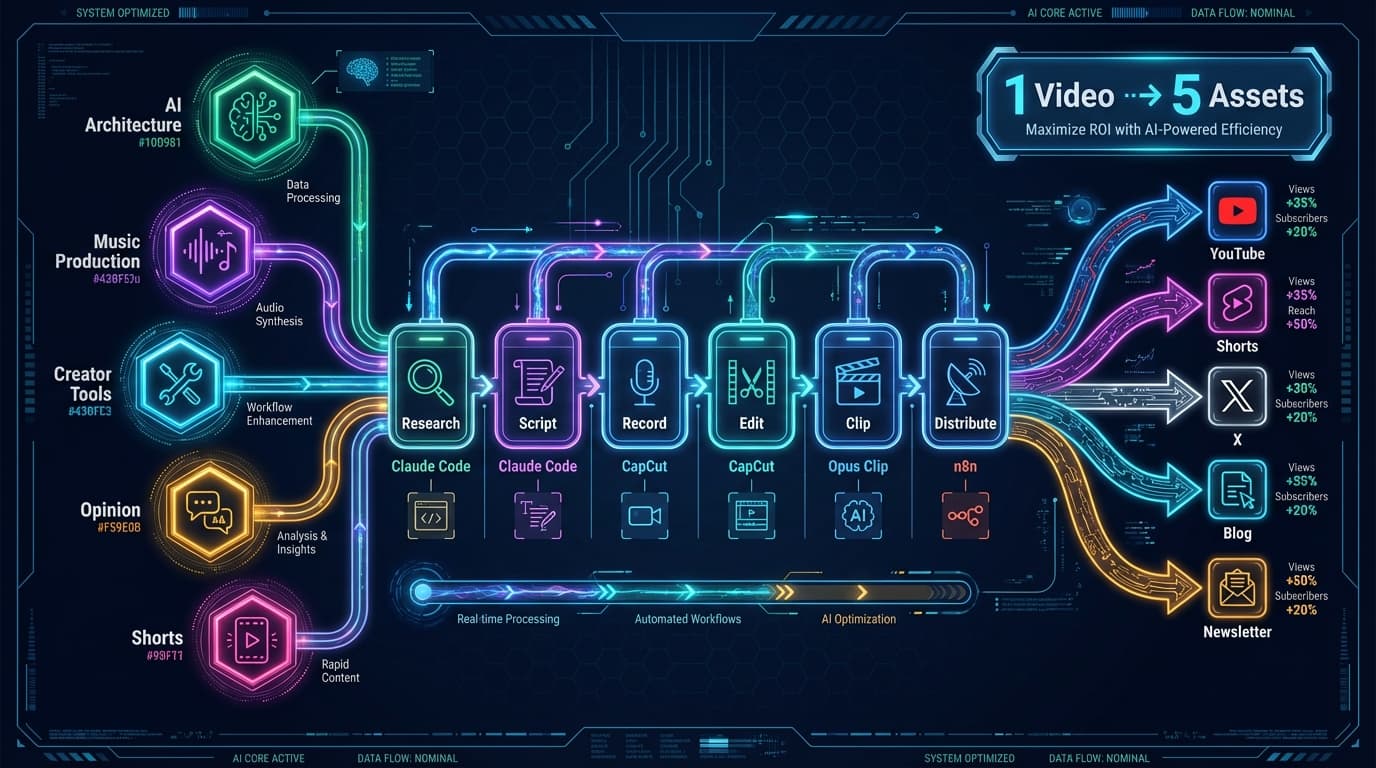
Research
/deep-research
Script
/video-produce
Record
CapCut + mic
Edit
CapCut Pro
Clip
Opus Clip
Distribute
n8n + ACOS
1 Video → 5 Assets
The AI Creator's Toolkit
Six tools that form the foundation of an AI-powered production studio.
Claude Code
AI-powered scripting, research, and workflow automation. The backbone of every production step.
Opus Clip
AI clip extraction from long-form video. Identifies viral moments and generates optimized shorts.
CapCut
Video editing with auto-captions, transitions, and effects. Fast enough for daily production.
Suno AI
AI music generation for intros, outros, and background tracks. Custom music for every video.
n8n
Workflow automation connecting all tools. Auto-distribute, auto-notify, auto-index.
ACOS
Agentic Creator OS — the meta-layer that orchestrates all tools into one system.
The Content Triangle
Every video should serve one of three goals. Balance all three over time for sustainable growth.
Authority
Build credibility
- Deep tutorials
- Architecture patterns
- Production walkthroughs
- Case studies
Reach
Grow your audience
- Shorts & clips
- Hot takes
- Trend reactions
- Tool comparisons
Connection
Build community
- Behind the scenes
- Build-in-public logs
- Q&A sessions
- Creator stories
Start Building Your Channel
See this framework in action on the FrankX YouTube channel, or get the complete GenCreator OS for templates, workflows, and ready-made production systems.
Get strategy updates by email